Home / Semantic caching / Semantic Caching for LLM Applications
TutorialSemantic Caching for LLM Applications
Semantic caching for LLM apps stores past prompts and responses as embeddings and returns a stored response when a new prompt means the same thing, skipping the model call. An exact-match cache only helps when users type identical text; a semantic cache also catches paraphrases such as “I forgot my password” and “how do I reset my password”. It sits between the application and the LLM, after an exact-match check. The hard part is the similarity threshold. In this site’s test, paraphrases and look-alike questions needing different answers had nearly the same median similarity, 0.608 and 0.611. A general embedding model cannot separate them. Use a cache-tuned model, scope hits tightly, expire entries, and measure wrong answers, not just hit rate.
Semantic caching in four facts
- A semantic cache returns a stored LLM response when a new prompt is close enough in embedding space.
- “Enable 2FA” and “disable 2FA” scored 0.882 cosine similarity in our test: closer than most true paraphrases.
- In a simulated stream, the semantic layer added 12 to 18 points of hit rate, but about 7 percent of those hits were wrong.
- A fine-tuned 149M-parameter model reached higher cache precision than much larger general models in Redis researchers’ tests.
What is semantic caching in LLM apps?
Semantic caching in LLM apps is a cache whose keys are prompt embeddings rather than exact strings, so a new prompt can reuse a stored response if it means the same as an earlier one. It cuts cost and latency on repeated questions.
A traditional cache uses string equality, as Microsoft’s Azure Cosmos DB documentation notes, so “What is the largest lake in North America?” and “Which North American lake is biggest?” are separate entries. A semantic cache embeds each prompt, finds the nearest stored prompt by vector similarity, and returns its response when the similarity clears a threshold.
Weaviate described the idea in its Healthsearch demo, where generating answers with GPT-4 was slow. The queries “Helpful for joint pain” and “Good for joint pain” differ as strings but mean the same, so embedding them lets the second reuse the first’s result. The same post noted that a cache also gives a fallback during LLM API outages.
Semantic caching is a form of similarity search applied to prompts. It differs from the prompt caching some model providers offer, which reuses computation for a repeated prompt prefix but still runs the model.
How does LLM caching work?
LLM caching works by checking whether a prompt, or one like it, has been answered before, and returning that answer instead of calling the model. There are two common layers, exact and semantic.
- Normalize: lowercase, trim, and strip formatting from the prompt, plus any context that affects the answer.
- Exact lookup: hash the normalized text and check a key-value store. A hit returns immediately.
- Embed: on an exact miss, embed the prompt with a small, fast model.
- Semantic lookup: find the nearest cached prompt in a vector index, within the same scope.
- Decide: if similarity clears the threshold, return the stored response; otherwise call the LLM.
- Store: save the new prompt, its embedding, and the response, with an expiry time.
GPTCache, Zilliz’s open-source library, splits this into modules: an LLM adapter, an embedding generator, cache storage, a vector store, a cache manager that controls both stores, and a similarity evaluator. That last part decides whether a near match counts, which is where most of the difficulty lies.
The exact layer is cheap and safe, so keep it first. In our simulated stream, most hits came from exact repeats; the semantic layer then added hits on top. GPTCache covers that library in detail.
Where does a semantic cache sit in an LLM application?
A semantic cache sits in front of the LLM call, after the application has assembled the prompt and before any request goes to the model provider. Everything that changes the answer must be part of what the cache compares.
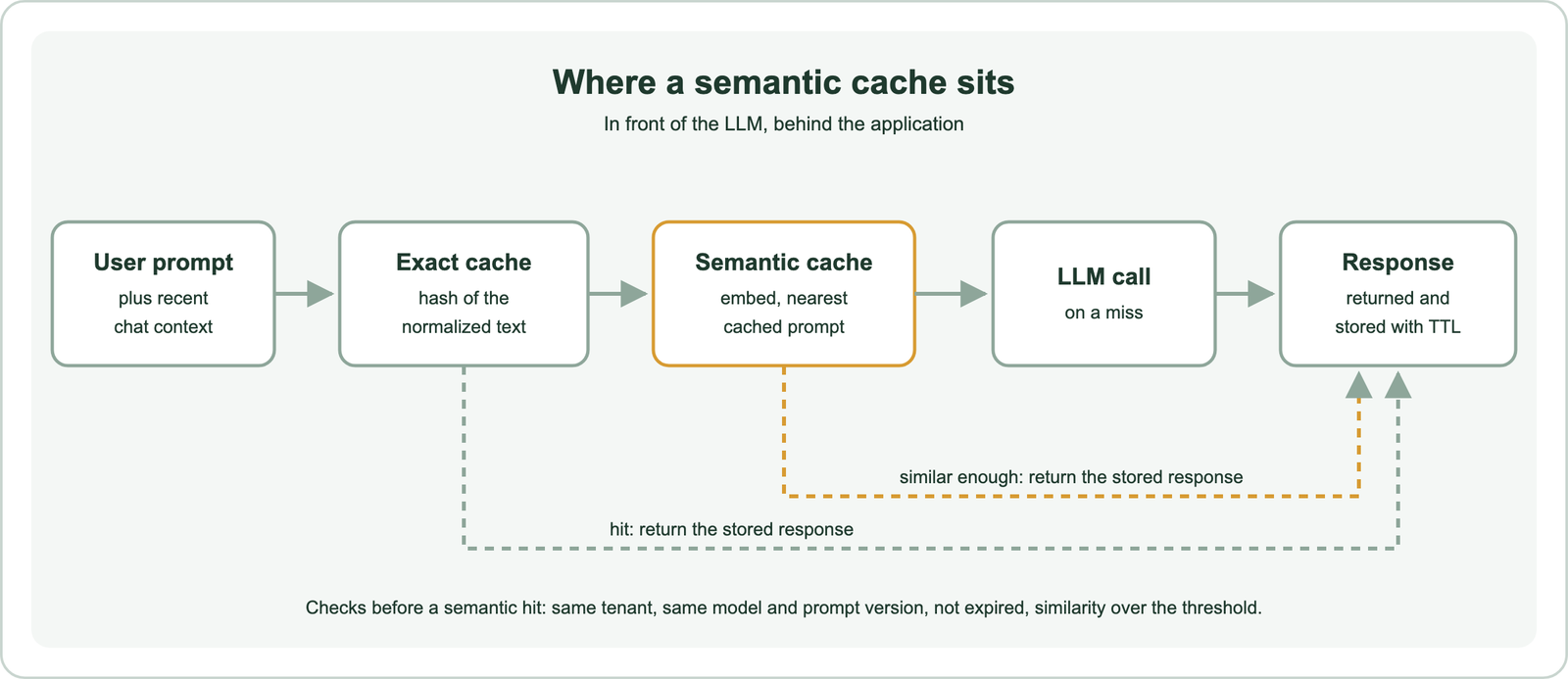
Placement decides what a hit means. If the system prompt, the model, the retrieved RAG context, or the user’s account changes the answer, those must be part of the cache scope. A cached answer generated for one customer’s data must never be served to another. In practice, scope lookups with filters on tenant, model version, and prompt template version.
In a RAG system, a cache can sit at two points. Caching the final answer saves both retrieval and generation, but goes stale when documents change. Caching only retrieval results saves less, but keeps generation fresh. Semantic search in RAG covers the retrieval side.
Why is the similarity threshold the hard part?
The similarity threshold is the hard part because paraphrases that should share an answer and look-alike questions that need different answers can have the same embedding similarity. No single cutoff separates them with a general model.
We ran a direct check. We wrote 30 customer-support intents with four paraphrases each, and 30 near-miss pairs: questions that look alike but need different answers. Examples include “enable” versus “disable” two-factor authentication, and “annual” versus “monthly” billing. We embedded everything with the open all-MiniLM-L6-v2 model and measured cosine similarity.
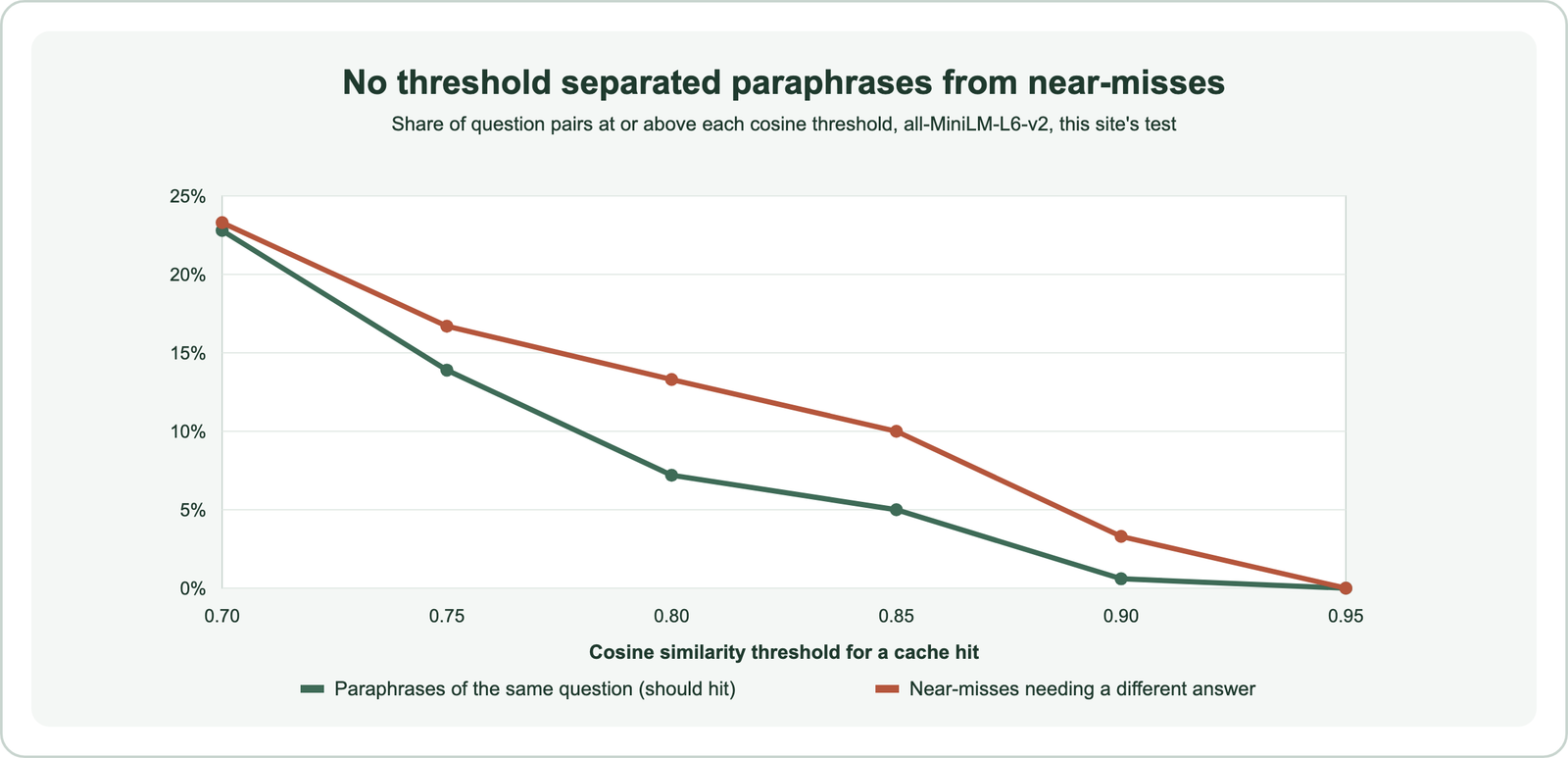
The paraphrase pairs had a median similarity of 0.608; the near-miss pairs had 0.611. At a threshold of 0.85, 5 percent of paraphrase pairs would hit, but so would 10 percent of near-misses. The closest near-miss was “How much storage do I get?” against “How much storage am I using?”, at 0.923, higher than almost any true paraphrase.
| Cached question | New question | Cosine |
|---|---|---|
| How much storage do I get? | How much storage am I using? | 0.923 |
| Can I change my plan to annual billing? | Can I change my plan to monthly billing? | 0.886 |
| How do I enable two-factor authentication? | How do I disable two-factor authentication? | 0.882 |
| How do I turn off email notifications? | How do I turn on email notifications? | 0.837 |
The reason is how embeddings work. A sentence embedding captures topic and phrasing, and a single changed word like “on” or “off” barely moves it. Paraphrases with different wording can move further apart than opposites with the same wording. Why vector search returns irrelevant results explains the same effect in search.
What hit rates can you expect from a semantic cache?
You can expect hit rates that depend mostly on how repetitive your traffic is, with the semantic layer adding a smaller share on top of exact repeats. The added share comes with a wrong-answer rate you must measure.
We simulated a stream of 2,000 support questions drawn from the 30 intents, with popular intents asked far more often, and 10 percent near-miss questions mixed in. The cache stored each miss and answered later questions above the threshold. Because each intent had only four phrasings, exact repeats were common; real traffic is more varied, so treat the totals as an upper bound.
| Threshold | Total hit rate | Exact repeats | Semantic-only hits | Wrong among semantic hits |
|---|---|---|---|---|
| Exact match only | 92.5% | 92.5% | 0 | 0 |
| 0.75 | 93.9% | 75.7% | 18.2% | 7.4% |
| 0.80 | 93.4% | 80.2% | 13.2% | 7.5% |
| 0.85 | 93.2% | 81.6% | 11.6% | 7.4% |
| 0.90 | 92.7% | 92.4% | 0.2% | 1 of 5 |
Two lessons follow. First, the exact layer did most of the work, so measure your own exact-repeat rate before building anything semantic. Second, at thresholds low enough for the semantic layer to matter, about 1 in 14 semantic hits returned the wrong answer with this model. At 0.90, the wrong answers nearly vanished, and so did the semantic hits.
The Redis research paper on semantic caching cites earlier studies showing that users of online services often repeat queries, which is what makes caching worthwhile. How often they repeat is specific to each application. Log a week of prompts, count exact and near repeats, and estimate savings from your own numbers.
Which embedding model works best for a semantic cache?
The embedding model that works best for a semantic cache is a small, fast model fine-tuned to tell same-meaning questions from look-alikes in your domain. General-purpose similarity models are trained for a different job.
A 2025 paper by Waris Gill and colleagues at Redis fine-tuned ModernBERT, a roughly 149-million-parameter encoder, for cache matching. Training used pairs labeled as duplicates or distinct, including synthetic ones. The fine-tuned model, which they call LangCache-Embed, outperformed larger open and proprietary models on Quora duplicate questions and a medical dataset. It also had the lowest embedding time of the models compared.
Synthetic data mattered. On the medical dataset, fine-tuning on purely synthetic pairs raised precision from 78 to 87 percent. The authors also warn that overly long fine-tuning on one domain hurts performance elsewhere, so they limited training to avoid that loss. Our near-miss pairs are exactly the kind of hard negatives such training needs.
Speed matters because the cache runs on every request. In this site’s timing test, all-MiniLM-L6-v2 embedded a query in about 2.2 ms on a laptop CPU, far less than the seconds an LLM call can take. Choosing an embedding model covers model selection.
What should you cache and what should you not?
You should cache stable, general answers that many users ask for, and you should not cache answers that depend on time, the individual user, or fresh data. The cost of a wrong hit decides the line.
| Cache it | Do not cache it |
|---|---|
| FAQ answers and policy explanations | Account balances, order status, anything personal |
| Product descriptions and how-to steps | Prices, stock, weather, news, anything time-sensitive |
| Classification or extraction of identical inputs | Creative tasks where users expect variety |
| Expensive, deterministic tool results | Actions with side effects, such as sending or paying |
Generation settings matter too. GPTCache ties cache use to temperature: at 0 it always searches the cache, and at 2 it always skips to the model, because a high temperature signals that the caller wants fresh output. A simpler rule is to cache only low-temperature, deterministic calls.
Negations and opposites deserve special handling, given our results. Some teams add a cheap verification step for semantic hits, such as a cross-encoder or a small model asked whether two questions share an answer. That adds a few milliseconds but catches most “on” versus “off” errors. Bi-encoder versus cross-encoder explains why a cross-encoder judges pairs more precisely.
How do you cache multi-turn conversations?
You cache multi-turn conversations by including the recent conversation context in what the cache compares, not just the last message. A follow-up question means nothing on its own.
Microsoft’s documentation gives the example. After “What is the largest lake in North America?”, the follow-up “What is the second largest?” only makes sense with the first question attached. Its recommendation is for the cache to work within the context window: vectorize the recent prompts together with the last one, and match against stored sequences.
The alternative is to rewrite the follow-up into a standalone question first, such as “What is the second largest lake in North America?”, and cache that. Rewriting costs a model call but makes cached entries reusable across conversations. Either way, never match a bare follow-up against the cache. Hybrid search for RAG discusses query rewriting for follow-ups.
How do you expire and invalidate cached answers?
You expire cached answers with a time to live on each entry, and you invalidate them when the model, the prompt template, or the underlying facts change. A semantic cache needs the same maintenance as any cache.
Microsoft’s guidance lists the usual options: a TTL per item, a maximum cache size, or a cap on item count. It also suggests keeping a hit count on each entry and pruning rarely used ones, so popular answers survive while one-off questions age out.
Weaviate added object time-to-live in version 1.36. A collection can expire objects by creation time, last update time, or a date property, and can hide expired objects from queries before deletion runs. Deletion only happens if the OBJECTS_TTL_DELETE_SCHEDULE setting is configured on the instance, and the minimum TTL is 60 seconds. Weaviate’s release notes list cache invalidation as a use case.
Version changes need explicit invalidation. Store the model name and prompt template version with each entry, filter lookups on the current versions, and old entries stop matching immediately. When source documents change, clear or re-validate answers that cite them. Real-time indexing and index freshness covers keeping data current.
How does semantic caching work for AI agents?
Semantic caching for AI agents applies the same idea to the many model calls an agent makes, such as planning steps, tool selections, and tool results, not just the final answer. Agents repeat sub-tasks often, which makes caching attractive.
An agent answering support questions may plan the same steps, call the same lookup tools, and summarize similar results across many sessions. Caching a stable sub-step, like “find the refund policy section”, can save several model calls per run. DeepLearning.AI offers a short course, Semantic Caching for AI Agents, taught by engineers from Redis, which reflects growing interest in the pattern.
The risks grow with autonomy. A wrong cached plan or tool result can send an agent down the wrong path, and actions with side effects must never come from a cache. Cache read-only, deterministic steps, scope them tightly, and keep the similarity threshold strict. Agentic retrieval and agentic search covers how agents use search.
Does LLM training use KV cache?
LLM training does not use a KV cache in the usual sense; the KV cache is an inference-time optimization that stores attention keys and values for tokens already generated. It is unrelated to semantic caching.
When a model generates text one token at a time, each new token attends to all earlier tokens. The KV cache keeps the earlier tokens’ key and value vectors in memory, so the model does not recompute them at every step. Training processes whole sequences in parallel, so it has no step-by-step generation to speed up this way.
The confusion comes from the shared word “cache”. A KV cache speeds up a single model call; provider prompt caching reuses work across calls with the same prompt prefix. A semantic cache skips the model call entirely for a similar earlier prompt. They can be used together.
How do you build a semantic cache with Weaviate?
You build a semantic cache with Weaviate by storing each prompt and response in a collection with a vectorizer and a TTL. Before each LLM call, query it with a strict distance limit and scope filters. The pieces are built in.
import datetime
import weaviate
from weaviate.classes.config import Configure, Property, DataType
from weaviate.classes.query import Filter, MetadataQuery

client = weaviate.connect_to_local()
client.collections.create(
    "LLMCache",
    vector_config=Configure.Vectors.text2vec_openai(source_properties=["prompt"]),
    properties=[
        Property(name="prompt", data_type=DataType.TEXT),
        Property(name="response", data_type=DataType.TEXT),
        Property(name="tenant", data_type=DataType.TEXT),
        Property(name="prompt_version", data_type=DataType.TEXT),
    ],
    object_ttl_config=Configure.ObjectTTL.delete_by_creation_time(
        time_to_live=datetime.timedelta(hours=24),
        filter_expired_objects=True,
    ),
)
cache = client.collections.use("LLMCache")

def cached_answer(prompt, tenant, version, call_llm, max_distance=0.08):
    scope = (Filter.by_property("tenant").equal(tenant)
             & Filter.by_property("prompt_version").equal(version))
    hit = cache.query.near_text(query=prompt, distance=max_distance, filters=scope,
                                limit=1, return_metadata=MetadataQuery(distance=True))
    if hit.objects:
        return hit.objects[0].properties["response"]
    response = call_llm(prompt)
    cache.data.insert({"prompt": prompt, "response": response,
                       "tenant": tenant, "prompt_version": version})
    return response
Weaviate’s cosine distance is 1 minus cosine similarity, so a maximum distance of 0.08 means a similarity of at least 0.92. Start strict and loosen only after measuring wrong answers on labeled pairs from your traffic. Put an exact-match lookup in front, and set OBJECTS_TTL_DELETE_SCHEDULE so expired entries are removed. Semantic search with Weaviate covers the setup.
How do you measure whether a semantic cache is working?
You measure a semantic cache by tracking hit rate, wrong-answer rate on semantic hits, latency saved, and cost saved, separately for exact and semantic hits. Hit rate alone rewards a cache that is too loose.
Wrong answers are the metric most teams skip. Sample semantic hits each week, check whether the cached answer actually fits the new question, and track the error rate per threshold. Logicmonitor’s write-up on semantic caching argues the same point: caching changes the cost math, but it needs monitoring to stay trustworthy.
Savings are simple to estimate once rates are known. Each hit saves one LLM call and adds an embedding and a vector lookup, a few milliseconds. Each wrong hit costs whatever a wrong answer costs your users. Compare the two before lowering the threshold. The cost of semantic search covers the infrastructure side.
Semantic caching puts a vector lookup in front of the LLM so that paraphrased questions reuse stored answers. Our tests showed both its value and its main risk. The semantic layer added hits beyond exact repeats, but a general embedding model scored opposites like “enable” and “disable” as near-identical. Put an exact cache first, scope semantic hits by tenant and version, expire entries, and use a cache-tuned model or a verification step. Then measure wrong answers before you trust the hit rate.