Home / Build it / Migrating Semantic Search to a New Vector Database
TutorialMigrating Semantic Search to a New Vector Database
Migrating to a new vector database means moving your objects, metadata and vectors into a new system, rebuilding its indexes, and switching search traffic over without losing results or uptime. A safe migration runs in six phases. Plan the mapping of schema, distance metric and filters. Backfill existing data with stable IDs. Dual-write new changes to both systems. Verify counts, result overlap and latency. Cut over with a flag or alias, keeping a rollback path. Finally, retire the old system. Vectors can move as they are only if you keep the same embedding model and distance metric; otherwise you must re-embed from the source text. In Weaviate, the client’s iterator exports a collection with its vectors, batch import loads it, and collection aliases switch traffic between collections instantly.
Vector database migration in four facts
- Existing vectors can be reused only with the same embedding model, normalization and distance metric.
- The vector index, keyword index and quantization are always rebuilt in the new system, never copied.
- Dual writes keep both systems current, so cutover and rollback need no data freeze.
- Weaviate collection aliases, generally available since version 1.33, switch a stable name to a new collection.
Why do teams migrate to a new vector database?
Teams migrate to a new vector database when the current one no longer fits on cost, scale, features or operations, such as hybrid search, multi-tenancy, filtering speed or hosting model. A migration is a project, not an export button.
Common triggers include a prototype database that cannot handle production scale, a need for native keyword and hybrid search, data residency rules, or a move between managed and self-hosted. Some teams start with a vector extension in their relational database and outgrow it; the trade-offs are covered in semantic search with Postgres and pgvector. Others consolidate several search systems into one.
Before committing, confirm the target actually solves the problem with your data. Run the comparison described in choosing a vector database for semantic search, on a sample of your own documents and queries. The migration plan then starts from what you learned in that test.
What are the phases of a vector database migration?
The phases of a vector database migration are plan, backfill, dual write, verify, cut over and retire. The old system keeps serving users until the new one is proven.
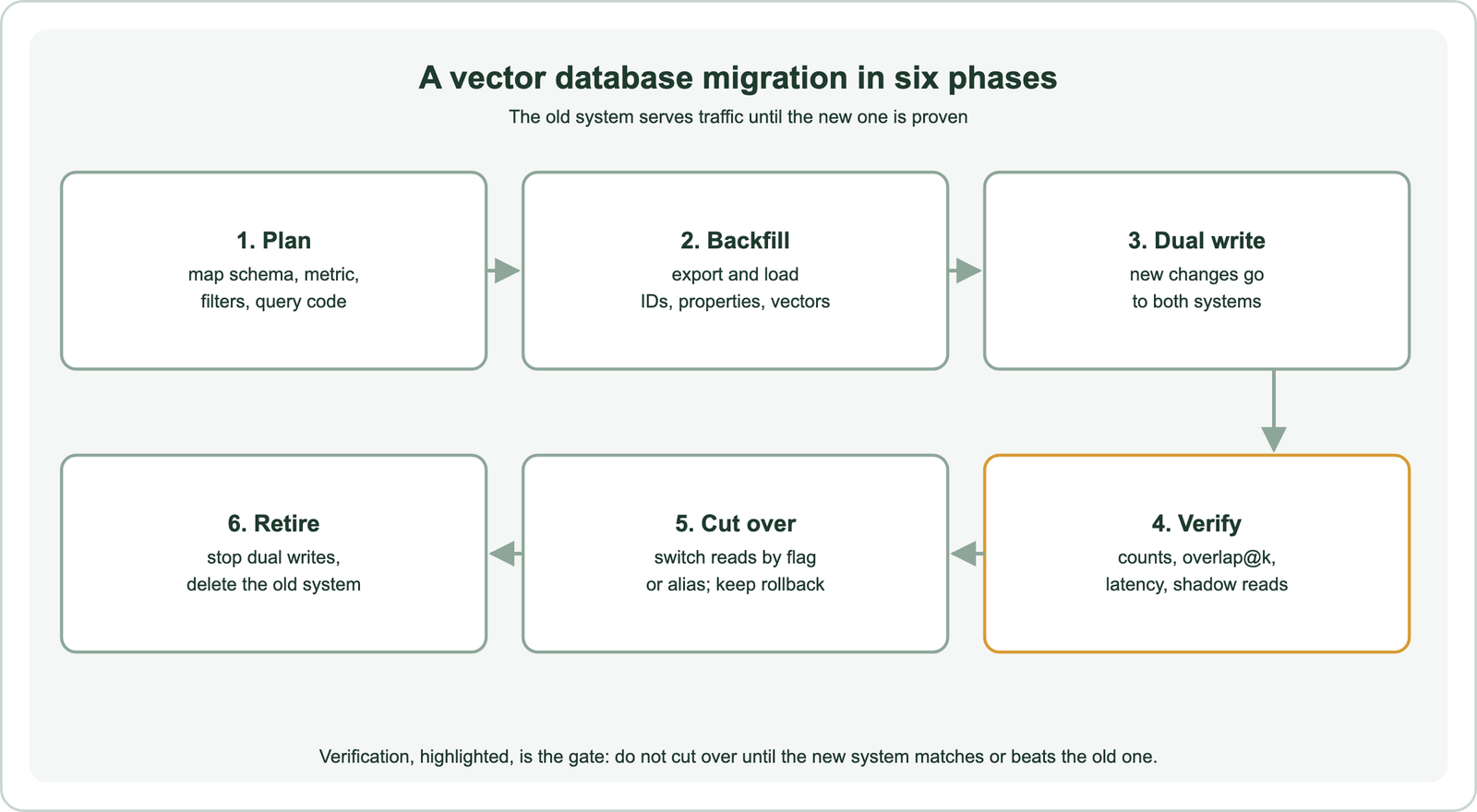
The order matters. Starting dual writes before the backfill finishes risks gaps, so record a timestamp or change marker when the export begins. Replay changes made after that point once the backfill completes. Alternatively, start dual writes first and make the backfill idempotent, so a document written by both paths ends up identical.
Each phase has an exit check. Planning ends with a written mapping. Backfill ends when counts match. Verification ends with agreed thresholds met. Cutover ends when traffic has run cleanly for a set period, and retirement waits until the rollback window closes.
What should you plan before migrating?
Before migrating, you should map the schema, the distance metric, the embedding model, the filters, the keyword settings and every query pattern from the old system to the new one. Most migration bugs are mapping bugs.
Start with data. List every property, its type and whether it is filtered, searched or only displayed. Decide on object IDs: keeping the source IDs, or deriving deterministic IDs from them, makes retries and dual writes safe. Check vector details: dimension count, whether vectors are normalized, and whether the old system used cosine, dot product or Euclidean distance. Search index schema design covers the decisions in the target schema.
Then list queries. Record each query type the application runs: pure vector, keyword, hybrid, filtered, faceted or grouped. Note scoring settings, such as hybrid weights or similarity thresholds, because score scales differ between systems. A cosine similarity of 0.8 in one product may appear as a distance of 0.2 in another, so thresholds must be recalibrated, not copied. Multi-tenant data needs its isolation pattern mapped too.
Can you reuse existing vectors in the new database?
You can reuse existing vectors in the new database if you keep the same embedding model, the same preprocessing and normalization, and a matching distance metric. Otherwise, re-embed from the source text.
Reusing vectors saves the cost and time of embedding the whole corpus again. It also keeps one variable fixed, so any change in results comes from the database, not the model. Weaviate’s documentation notes that you can supply existing vectors directly at import, for example when migrating data from another system. Queries must then be embedded with the same model at search time.
Re-embed when the old vectors came from a model you no longer want, or when the old system stored only compressed vectors you cannot recover. Avoid changing the database and the model in one step if you can. Doing both at once means a drop in quality cannot be traced to either. Migrate first, then follow re-embedding when the model changes as a second project.
Which parts of a vector index carry over and which are rebuilt?
Objects, IDs, properties and compatible vectors carry over, while the vector index, keyword index, quantization and query logic are rebuilt in the new system. Index structures are product-specific and cannot be copied.
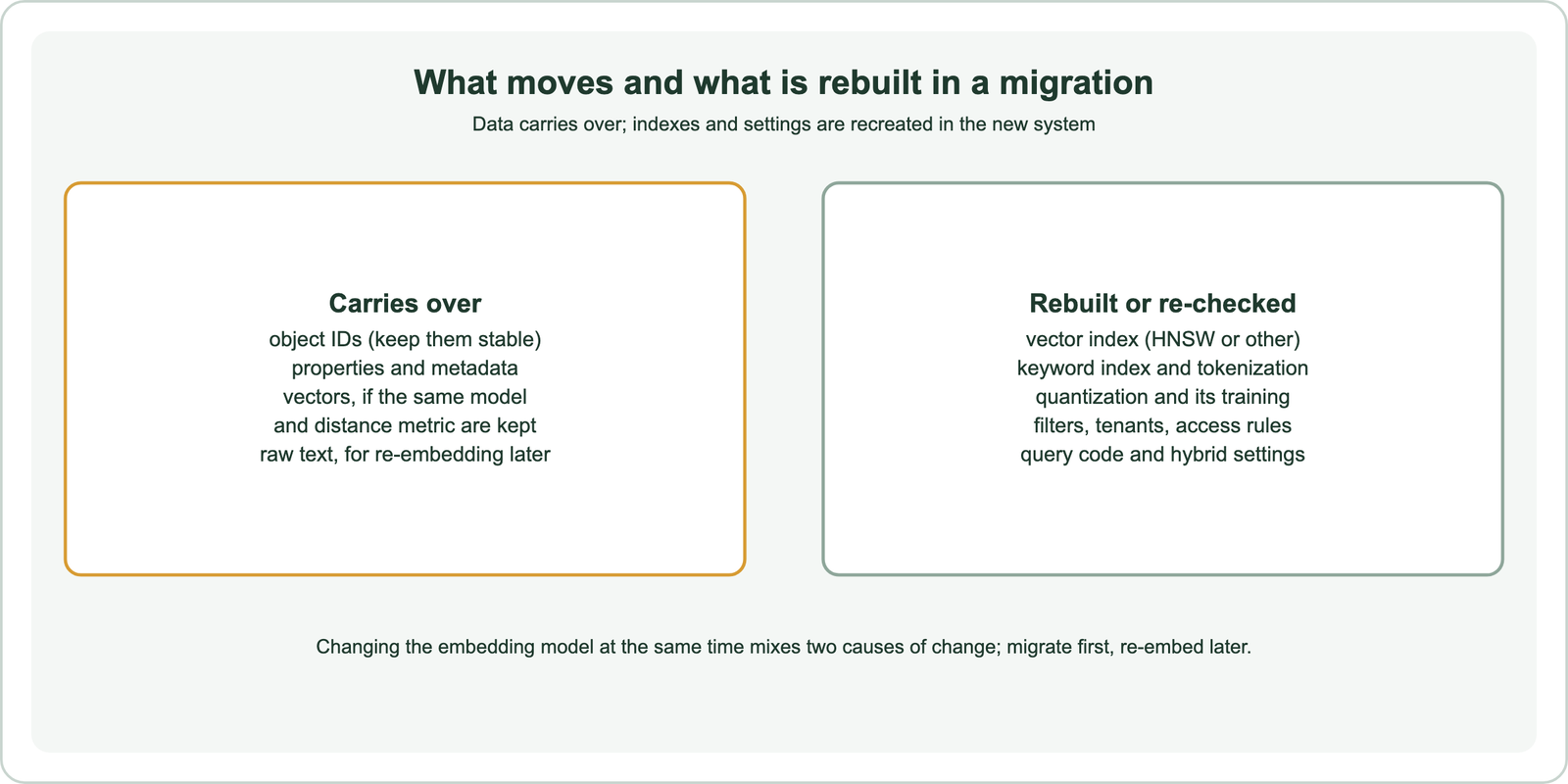
The new database builds its own approximate nearest neighbour index as data arrives, using its own parameters. Keyword search uses its own tokenizer and statistics, so BM25 scores will differ even for identical text. Quantization settings are chosen again, and trained methods learn from the imported data. Access rules and tenant boundaries must be recreated and tested.
Always keep the raw text alongside the vectors in the new system. It makes future re-embedding possible without going back to the original sources. It also enables keyword and hybrid search, which a vectors-only export cannot support.
How do you export and load data without loss?
You export and load data without loss by reading the source in pages with a cursor, writing to the target in batches with stable IDs, recording failures, and checking counts at the end. The job should be resumable.
Most vector databases offer a scroll, cursor or list API that returns objects with their vectors in pages; relational stores can export with SQL. Read with a cursor rather than large offsets, which slow down or fail deep into a collection. Write to the target with its batch import, as described in batch embedding, and log the last cursor position so a crash resumes rather than restarts.
from weaviate.util import generate_uuid5

target = client.collections.use("Docs_v2")
with target.batch.fixed_size(batch_size=200) as batch:
    for row in read_source_in_pages():   # your export from the old system
        batch.add_object(
            properties={"title": row["title"], "body": row["body"]},
            vector=row["vector"],         # reuse only with the same model and metric
            uuid=generate_uuid5(row["id"]),
        )
print(len(target.batch.failed_objects), "failed")
For moves between two Weaviate instances, Weaviate’s migration guide reads the source with the collection iterator, including vectors, and writes each object to the target with its UUID and vector. The same pattern works across tenants. After loading, compare object counts per collection or tenant, and spot-check a sample of objects field by field.
How do you verify search quality before cutover?
You verify search quality before cutover by running the same set of real queries against both systems and comparing result overlap, relevance metrics, filters and latency. Shadow reads extend the test to live traffic.
Take a few hundred real queries from logs. For each, compare the top 10 results from both systems and record the overlap. Identical results are not expected, since both use approximate search, so judge the differences. Where you have relevance judgments, compute the same metrics on both, as in how to evaluate semantic search. Measure each system’s ANN recall against exact search to separate index settings from data problems.
Shadow reads send a copy of live queries to the new system without showing its results, then log the comparison. They expose query types and filters your test set missed, plus real latency under load. Check filtered and hybrid queries separately, because they differ most between products. Agree the thresholds for cutover before looking at results.
How do you cut over without downtime?
You cut over without downtime by switching reads to the new system behind a feature flag or alias while dual writes continue, so you can switch back instantly if problems appear. Moving traffic in stages lowers the risk further.
Route a small share of users to the new system first, watch errors, latency and click-through, then increase the share. Keep dual writes running through this period so the old system stays current for rollback. Online search metrics and analytics describes the signals to watch. Only stop dual writes and retire the old system after the rollback window closes.
Inside Weaviate, collection aliases make later migrations simpler. An alias is a stable name that points to a collection. The application queries the alias, and one call switches it to a new collection.
client.alias.update(alias_name="Docs",
                    new_target_collection="Docs_v2")
Weaviate’s tutorials recommend this for schema changes and vectorizer changes, since rolling back means pointing the alias at the old collection again.
How do migration steps differ between vector databases?
Migration steps differ between vector databases mainly in export APIs, schema definition, ID formats, distance metric names and hybrid search features. The six phases stay the same.
Moving into Weaviate means defining collections with properties, vectorizer or self-provided vectors, and index settings, covered in semantic search with Weaviate. Weaviate object IDs are UUIDs, so derive them deterministically from source IDs with generate_uuid5. Besides Weaviate, other targets have their own build guides: Pinecone, Qdrant, Milvus, Chroma, Redis, Elasticsearch and OpenSearch.
Framework users have an extra layer. Applications built on LangChain or LlamaIndex often switch stores by changing an integration, but stored metadata formats differ between integrations and need mapping. Document pipelines, as in semantic search over documents and PDFs, may be easier to rerun than to export. The overall build is covered in how to build semantic search and semantic search with Python.
Migrating to a new vector database moves objects, metadata and compatible vectors, while the new system rebuilds its indexes. Plan the mapping of schema, metric, filters and queries, then backfill with stable IDs and dual-write new changes. Verify with real queries and shadow reads, cut over behind a flag or alias, and retire the old system after the rollback window. Reuse vectors only with the same model and metric, and change the model in a separate step. In Weaviate, the iterator, batch import and collection aliases cover export, load and instant switching.