Home / How it works / What Is Vector Search? How It Finds Results by Meaning
ExplainerWhat Is Vector Search? How It Finds Results by Meaning
Vector search is a way of finding information by turning data and queries into vectors, lists of numbers that capture meaning, and returning the stored vectors closest to the query. An embedding model creates the vectors, an index organizes them, and a distance metric such as cosine decides what “closest” means. Because similar meanings produce nearby vectors, vector search finds relevant results even when they share no words with the query. At small scale it can compare the query with every vector: in a quick test on a laptop, one million 384-dimension vectors took about 25 milliseconds per query. At larger scale, vector databases such as Weaviate use approximate indexes like HNSW to answer in milliseconds across millions of items. Vector search powers semantic search, recommendations, image search, and retrieval for LLM applications.
Vector search in four facts
- Items and queries become vectors; results are the nearest vectors by a distance metric.
- Exact search grows linearly with data: 10 times the vectors took about 10 times as long in our test.
- Approximate indexes such as HNSW, IVF-PQ, and Weaviate’s HFresh make large-scale search fast.
- Vector search works on text, images, audio, and any data an embedding model can encode.
What is vector search?
Vector search is a search technique that represents items as vectors and finds the items whose vectors are closest to a query vector. It is also called vector similarity search, nearest neighbor search, or vector-based search.
Weaviate’s explainer defines it as a technique for finding and retrieving similar items in large datasets by comparing their vector representations, which are numerical encodings of their features. Unlike traditional search, which relies on exact matches, vector search looks for similarity based on meaning or context.
The vectors usually come from an embedding model. A sentence like “affordable family car” becomes a list of a few hundred numbers. A review of a budget minivan gets a list that sits nearby in the same space, because the model learned that the two mean similar things. Search then becomes geometry: find the points closest to the query’s point. What embeddings are explains how those vectors are learned.
The idea is older than today’s AI boom, but modern embedding models made it practical for language. Vector search now sits underneath semantic search, recommendations, and the retrieval step of most RAG systems. The process has three parts.
How does vector search work?
Vector search works in three stages: embed the data, index the vectors, then embed each query and retrieve its nearest neighbors. The same model must embed both data and queries.
- Embed: an embedding model turns each item, such as a document chunk, image, or product, into a vector.
- Index: the vectors go into a structure built for fast nearest neighbor lookup, such as an HNSW graph.
- Query: the query is embedded with the same model, and the index returns the closest stored vectors, ranked by distance.
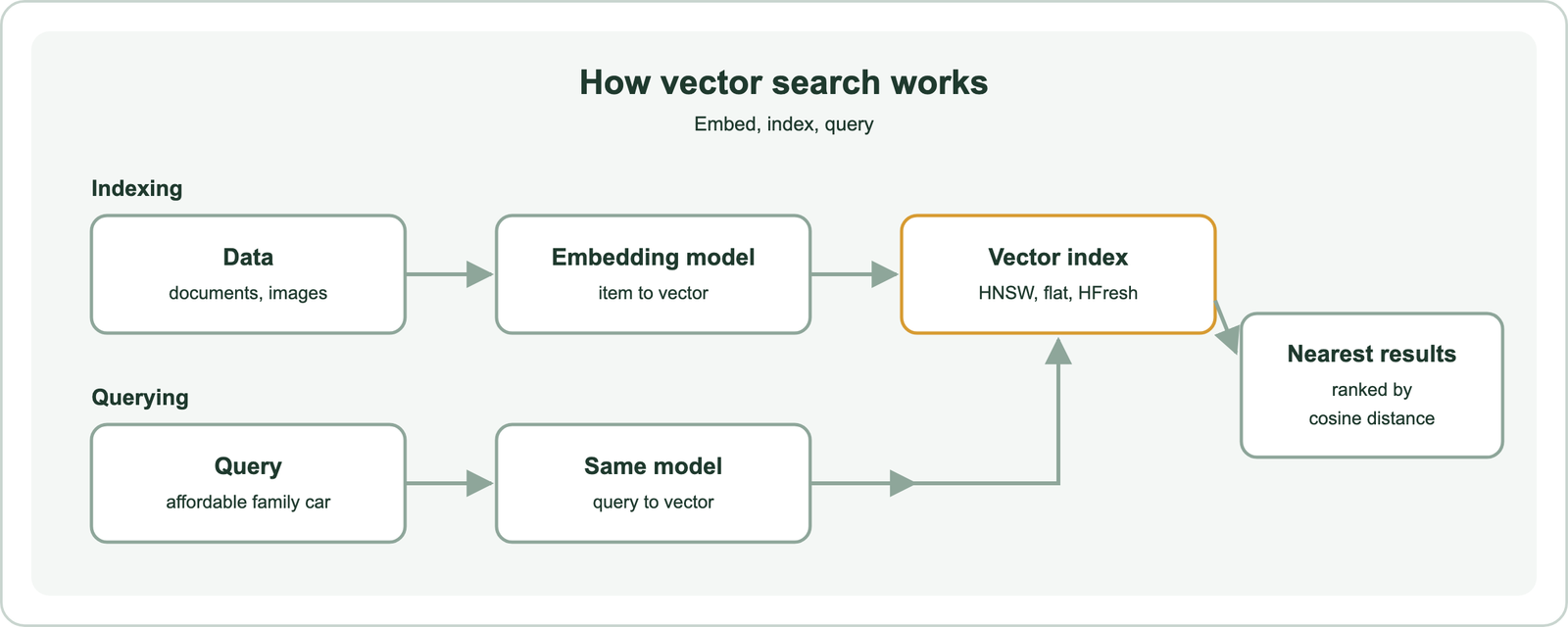
The distance metric defines “near.” Cosine distance compares the angle between vectors and is the default in Weaviate. Dot product and Euclidean distance are common alternatives, and the right one is the metric the model was trained with, as cosine, dot product, and Euclidean distance explains.
Weaviate’s explainer compares the process to a game of boules. The small target ball is the query vector, the other balls are the data vectors, and the task is to find the balls nearest the target. Measuring every ball works for a few; a large field needs a smarter method. Seeing the simple version in code makes the problem clear.
What does a simple vector search look like in code?
A simple vector search in code embeds a few texts, embeds a query, computes the similarity between the query and every text, and sorts the results. This exact, brute-force approach is how every vector search starts.
import numpy as np
from sentence_transformers import SentenceTransformer

model = SentenceTransformer("all-MiniLM-L6-v2")      # 384-dimension embeddings
docs = [
    "Budget minivan review for growing families",
    "Luxury sports car track test",
    "How to repot a houseplant",
]
doc_vecs = model.encode(docs, normalize_embeddings=True)

query_vec = model.encode("affordable family car", normalize_embeddings=True)
scores = doc_vecs @ query_vec                          # cosine similarity for unit vectors
for i in np.argsort(-scores):
    print(f"{scores[i]:.3f}  {docs[i]}")
Normalizing the vectors to unit length makes the dot product equal to cosine similarity, which is why one matrix multiplication scores every document. The results are exact: the true nearest neighbors, every time. This is what Weaviate calls a flat index, and it is the right choice for small collections.
The catch is that the work grows with the collection. Every query must touch every vector. That cost explains everything that follows about indexes and scale. First, though, it helps to see how this differs from the search most people know.
How is vector search different from regular keyword search?
Vector search is different from regular keyword search because it matches by meaning, through vector distance, while keyword search matches the words themselves, through an inverted index. Each finds results the other misses.
| Aspect | Keyword search | Vector search |
|---|---|---|
| Matches on | Shared words or tokens | Closeness in a vector space |
| Index | Inverted index | Vector index, such as HNSW |
| Ranking | BM25 or TF-IDF | Cosine, dot product, or Euclidean distance |
| Finds synonyms | Only with synonym lists | Yes, if the model learned them |
| Exact codes and names | Strong | Can blur them |
| Data types | Text | Text, images, audio, any embeddable data |
Weaviate’s explainer puts the core difference plainly. Vector search finds similar items based on the meaning of the data, while keyword search relies on exact word or phrase matches. A search for “healthy snacks” can return “nutritious food” through vectors, but not through keywords alone.
Vector search is often called semantic search, though the two are not quite the same, as semantic search versus vector search explains. And the two approaches combine well in hybrid search, which runs both and fuses the results. For vector search alone, the main engineering challenge is speed at scale.
How is vector search conducted at scale?
Vector search is conducted at scale with approximate nearest neighbor (ANN) indexes, which check only a small fraction of the vectors, plus compression and sharding to fit large collections in memory or across machines. Exact search alone grows too slowly.
A quick timing test of exact search shows why. On a laptop, using 384-dimension vectors and one matrix multiplication per query, the median query time grew in step with the data:
| Vectors | Memory (float32) | Median time per query |
|---|---|---|
| 10,000 | 15.4 MB | 0.14 ms |
| 100,000 | 153.6 MB | 2.41 ms |
| 1,000,000 | 1,536 MB | 24.55 ms |
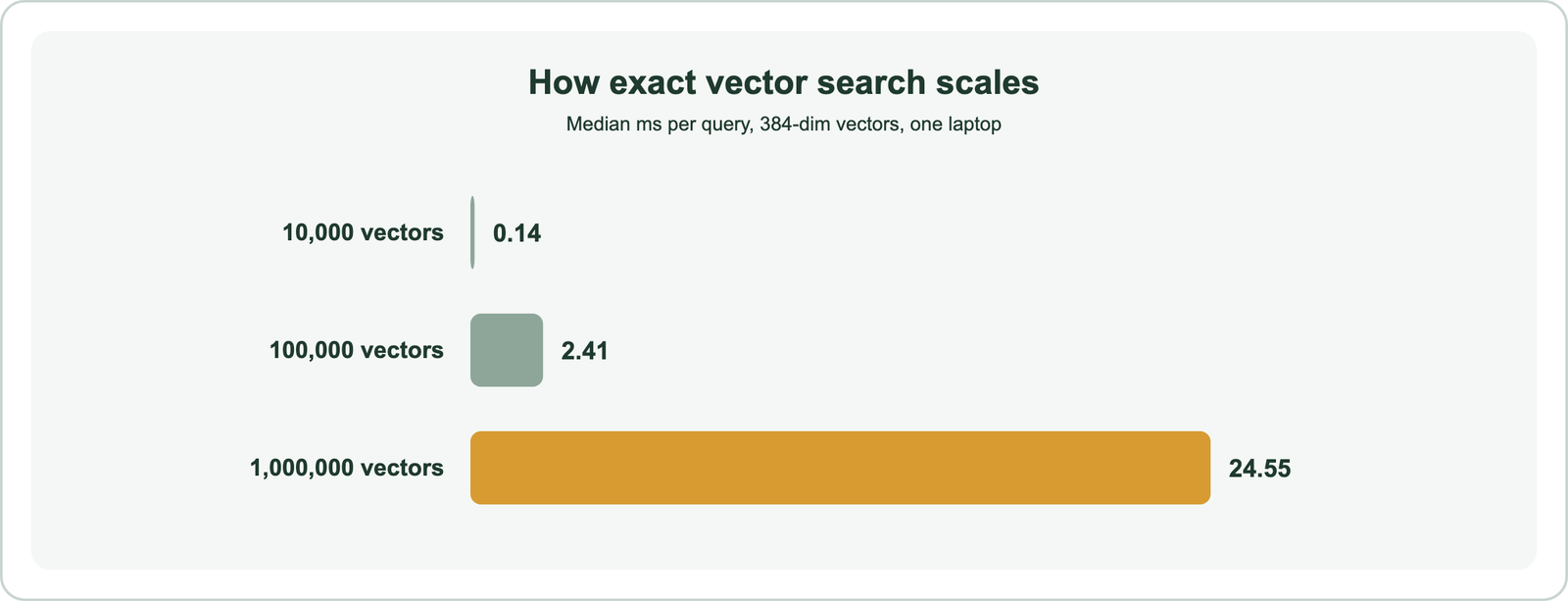
Weaviate’s binary quantization post reports a similar order of magnitude, about 23 milliseconds to brute force one million compressed 768-dimension vectors. Twenty-five milliseconds is fine for one query on a million vectors. It is not fine for a hundred million vectors, or for thousands of queries per second. Weaviate’s explainer describes the fix: approximate nearest neighbor algorithms trade a little accuracy for a huge gain in speed, with sublinear growth. Its HNSW implementation, it reports, keeps recall above 95% while answering in milliseconds.
Two more tools handle size. Compression shrinks each vector: Weaviate’s 8-bit rotational quantization reaches up to 98 to 99% recall at a quarter of the memory. Sharding splits a collection across machines; Weaviate places objects on shards with a hash of their ID and can replicate shards for availability. Its scaling guide notes that memory sets the maximum dataset size, while CPU drives query speed. Scaling semantic search covers capacity planning. The ANN index itself comes in several designs.
What is a vector search index, and how does IVF-PQ work?
A vector search index is a data structure that organizes vectors so the nearest ones to a query can be found without comparing every vector; IVF-PQ is one design that clusters vectors and compresses them. Different indexes trade speed, memory, and recall differently.
| Index | How it narrows the search | Memory | Typical fit |
|---|---|---|---|
| Flat | Does not; compares every vector | Lowest | Small collections, exact results |
| HNSW | Walks a layered graph of neighbors | High; graph and vectors in memory | Large collections, high throughput |
| IVF | Searches only the clusters nearest the query | Moderate | Large collections |
| IVF-PQ | Clusters, then compressed vector codes | Low | Very large collections, tight memory |
| Weaviate HFresh | HNSW over cluster centroids; clusters on disk | Low | Memory-constrained deployments |
IVF-PQ combines two ideas, described by Jégou, Douze, and Schmid in their 2011 paper on product quantization. The inverted file, or IVF, groups vectors into clusters around centroids; a query checks only the few clusters closest to it. Product quantization, or PQ, splits each vector into segments and replaces each segment with the ID of its nearest entry in a small codebook. A 384-number vector becomes a handful of bytes, and distances are estimated from the codes.
Weaviate’s HFresh index, added in version 1.36, follows a related cluster idea. It keeps an HNSW index over cluster centroids in memory, compressed with 8-bit rotational quantization, and stores the clusters on disk with 1-bit quantization. A query reads only the most relevant clusters, then rescores the best candidates against full vectors. Vector indexes and approximate nearest neighbor search cover each design. Indexes work the same way whatever the data is.
What kinds of data can vector search handle?
Vector search can handle any data that an embedding model can turn into vectors, including text, images, audio, video, and combinations of them. Weaviate’s documentation stresses that vector search is not limited to text.
- Text: documents, support tickets, product descriptions, code.
- Images: find visually similar photos or products from an image query.
- Audio and video: Weaviate’s explainer describes audio files and videos converted into vectors, so a clip can find similar clips.
- Multimodal: models such as CLIP place text and images in one space, so a text query can find pictures.
- Multilingual: multilingual models map languages together, so a Spanish query can find English documents.
Weaviate exposes these through query types such as near_text, near_image, and near_vector, with the right model configured per collection. Image, video, and audio search and multimodal embeddings go further. Text remains the most common use, especially alongside language models.
What role does vector search play in NLP and LLM applications?
Vector search plays the retrieval role in NLP and LLM applications: it finds the passages, examples, or memories that a language model needs, so the model answers from relevant information rather than memory alone. In AI, that is its most visible job.
Retrieval-augmented generation, or RAG, is the main pattern. Documents are split into chunks, embedded, and stored. When a user asks a question, vector search finds the most relevant chunks, and the language model writes an answer from them. Frameworks such as LangChain and LlamaIndex wrap this step as a “retriever” over a vector store.
Vector search also supports other language tasks. It can find semantically similar questions for deduplication, pick few-shot examples close to a new input, store long-term memory for AI agents, and power semantic caching, which reuses answers for similar questions. Semantic search in RAG and agentic retrieval cover these roles. All of them need somewhere to store and search the vectors.
Do you need a vector database for vector search?
You do not always need a vector database for vector search. Small or static collections can use a library or a general database with vector support, while large, changing, or filtered workloads benefit from a dedicated vector database such as Weaviate. The choice depends on scale and features.
There are three common routes. Weaviate’s explainer notes that vector libraries such as FAISS search in memory but store only vectors and usually need rebuilding when data changes. General search engines add vector fields. Elasticsearch has a dense_vector field with kNN search. OpenSearch provides vector search through its k-NN vector field type, so OpenSearch is a vector search engine as well as a keyword one. Cloud platforms from Google and Databricks offer managed vector search services too.
Dedicated vector databases such as Weaviate are built around vector search. They store objects and vectors together, update the index in real time, apply filters inside the search, run hybrid keyword and vector queries, and scale with sharding and replication. The difference between Elasticsearch and vector search, then, is not either-or: Elasticsearch is a search engine that now includes vector search, while vector search is the technique itself.
A practical rule: start with what you already run if the collection is modest and mostly static. Move to a vector database when vectors are central to the product, the data changes constantly, or you need filtering and hybrid search at scale. Semantic search tools compared lists options. In Weaviate, a vector search is one call.
How do you run vector search in Weaviate?
You run vector search in Weaviate by creating a collection with a vectorizer, adding objects, and calling near_text or near_vector on the collection. Weaviate embeds the text for you when a vectorizer is configured.
import weaviate
from weaviate.classes.config import Configure, Property, DataType
from weaviate.classes.query import MetadataQuery

client = weaviate.connect_to_local()

articles = client.collections.create(
    name="Article",
    properties=[Property(name="title", data_type=DataType.TEXT)],
    vector_config=Configure.Vectors.text2vec_weaviate(),   # Weaviate embeds the text
)
articles.data.insert_many([
    {"title": "Budget minivan review for growing families"},
    {"title": "Luxury sports car track test"},
    {"title": "How to repot a houseplant"},
])

response = articles.query.near_text(
    query="affordable family car",
    limit=2,
    return_metadata=MetadataQuery(distance=True),
)
for obj in response.objects:
    print(round(obj.metadata.distance, 3), obj.properties["title"])

client.close()
The index type is set per collection. Weaviate’s guidance is a flat index under about 100,000 objects and HNSW for large collections with high query rates. HFresh suits deployments where memory is the main constraint. A dynamic index starts flat and switches to HNSW as a collection grows. Filters, hybrid search, and reranking add on to the same query. Even well-built vector search has limits to plan for.
What are the challenges of vector search?
The challenges of vector search are that results depend on the embedding model, exact terms can be missed, approximate indexes can skip true neighbors, memory costs are high, and similarity is hard to explain. Each has a common mitigation.
- Model dependence: Weaviate’s explainer notes that search quality depends crucially on the model. Test models on your own data, as choosing an embedding model describes.
- Exact terms: product codes and names can be blurred. Add keyword search through hybrid search.
- Approximation: ANN indexes can miss true neighbors. Measure recall and tune the index, as ANN recall explains.
- Memory: one million 384-dimension vectors took 1.5 GB in our test before any index. Compression and smaller embedding dimensions help.
- Irrelevant top results: every vector has some nearest neighbor, so weak matches still appear. Use distance thresholds and filters, as similarity search covers.
- Explainability: a distance does not say why two items are close.
These challenges shape how production systems are built: vector search proposes candidates, while filters, keyword signals, and rerankers refine them. Related topics include dense vectors, how semantic search works, and metadata filtering.
Vector search turns data and queries into vectors and returns the nearest ones, which lets it find results by meaning across text, images, and audio. Exact search is simple but grows linearly, from 0.14 milliseconds at 10,000 vectors to about 25 at a million in our test. Large systems therefore use approximate indexes such as Weaviate’s HNSW and HFresh, or IVF-PQ. It is the retrieval engine behind semantic search and RAG, and it works best alongside keyword search and filters. The practical step is to choose an embedding model that fits your data, start with a flat or dynamic index, and move to HNSW or HFresh as the collection grows.