Home / Search evaluation / Why Does Vector Search Return Irrelevant Results?
Fix itWhy Does Vector Search Return Irrelevant Results?
Vector search returns irrelevant results because it always returns the nearest vectors, whether or not they are relevant. On top of that, the embedding model, the chunks, the query, the filters or the index settings can place the right documents farther away than the wrong ones. The causes fall into three groups. Data problems mean the answer is missing, embedded with the wrong model, or buried in a badly sized chunk. Model problems mean the embedding cannot tell look-alike texts apart, misses exact identifiers, or does not know the domain. Settings problems mean no distance threshold, approximate index recall that is too low, or filters applied in the wrong place. Diagnose in that order, checking whether the right document exists, whether it ranks in an exact search, and whether the index returns it. Fixes include hybrid search, better chunking, query rewriting, reranking and a calibrated threshold.
Irrelevant vector search results in four facts
- Weaviate’s documentation notes that vector search always returns some top results, because every vector is similar to some degree.
- Vectors from different embedding models are not comparable, so mixing models in one index ranks documents arbitrarily.
- General embedding models can miss exact identifiers such as product codes, which keyword search matches precisely.
- Low approximate index recall can drop relevant documents that exact search would have returned.
Why does vector search return irrelevant results?
Vector search returns irrelevant results because it ranks by closeness, not by relevance, and closeness depends on the embedding model, the data and the settings. It never answers “nothing matches” unless told to.
Weaviate’s documentation makes the first point directly: all compatible vectors are similar to some degree, so a search always returns top results regardless of relevance. Its example searches a collection of red shades with a query for “SkyBlue” and still gets back a red. In an application, that shows up as a confident list of results for a question the data cannot answer.
The second point is that “close” is defined by the embedding model. Two passages can be near each other because they share a topic, style or template while answering different questions. A model trained on web text may not know that two internal product names are different things. And the vectors are only as good as the text they were made from. Most irrelevant results trace to one of a short list of causes, which a fixed order of checks can separate.
How do you diagnose irrelevant vector search results?
You diagnose irrelevant vector search results by taking failing queries, finding the document that should have ranked first, and checking step by step where it was lost. Each step rules out one family of causes.
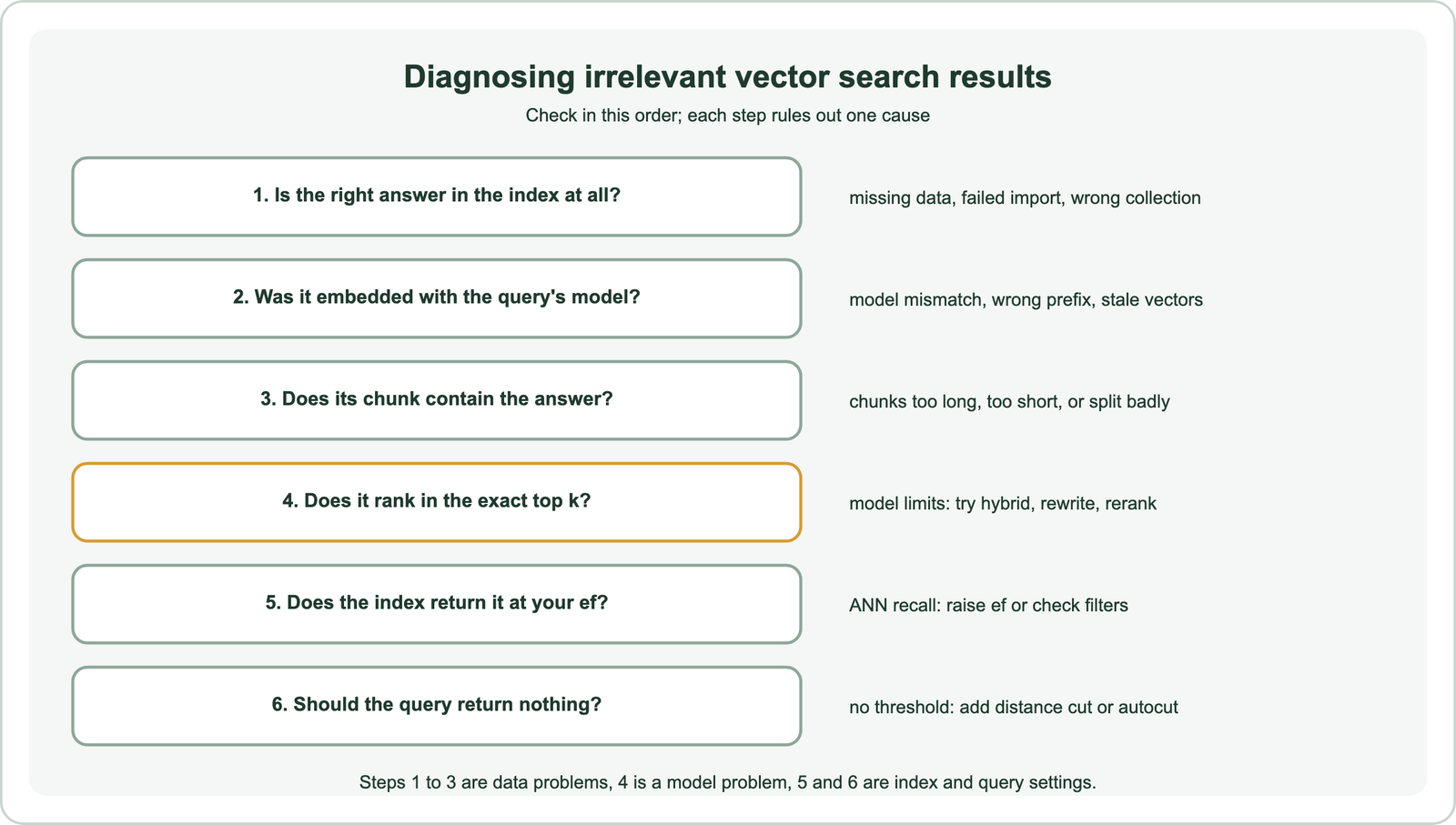
Start with a handful of real failing queries and, for each, the document a person would choose. Fetch that document’s stored chunks and check they exist and contain the answer. Run the query as an exact search, or with a very high ef, and note the right document’s rank and distance. If it ranks first in exact search but not in normal search, the index settings are at fault. If it ranks low even in exact search, the model or the chunking is.
Write the findings down per query. Patterns appear quickly: most failures on product codes point to the model, most failures on long policies point to chunking. A labelled set of such queries becomes the test set for every fix, as described in search test sets and relevance judgments. The first group of causes is the data itself.
How do data problems cause irrelevant vector search results?
Data problems cause irrelevant results through missing or partial imports, vectors from a different model than the query’s, stale vectors after edits, and chunks that do not contain a self-contained answer. They are common and easy to overlook.
Missing data is the simplest: an import failed silently, a source was never connected, or the query hits the wrong collection or tenant. Model mismatch is subtler. Vectors from two models, or from one model with and without its required query prefix, sit in different spaces, so distances between them are meaningless. Weaviate’s documentation notes that a collection’s vectorizer cannot be changed after creation for this reason; switching models means a new collection and re-embedding everything.
Chunking causes the most quiet damage. A chunk that is too long mixes several topics and its vector averages them, so it matches everything weakly. A chunk that is too short loses context, so “it applies after 30 days” matches nothing useful. Splitting a table or a list mid-way separates the answer from its subject. Chunking for semantic search covers sizing. Once the data is sound, the model is the next suspect.
How does the embedding model cause irrelevant results?
The embedding model causes irrelevant results when it places look-alike texts close together, ignores exact identifiers, misreads negation, or does not know the domain’s vocabulary. These limits remain even with perfect data.
Look-alikes are the classic failure. “How to enable two-factor authentication” and “how to disable two-factor authentication” differ by one word and land almost on top of each other. Templates do the same: hundreds of product pages with identical structure cluster tightly, so small differences decide the ranking. Identifiers are the second failure. A general model treats “ERR-4012” and “ERR-4021” as similar noise, while a user means exactly one of them.
Domain gaps make both worse. Weaviate’s academy course on evaluating embedding models lists common failure patterns: favouring longer documents over shorter relevant ones, struggling with negation, and poor handling of domain-specific terminology. The fix is usually to test models on your own queries rather than trust leaderboards, and to add what the model lacks. Hybrid search adds exact matching, rerankers add finer judgment, and fine-tuning adds the domain. Queries can be the problem too.
How do queries cause irrelevant vector search results?
Queries cause irrelevant results when they are vague, overloaded, or phrased so differently from the documents that their vectors land in the wrong region. A good document cannot be found by a query that does not describe it.
Very short queries, such as a single word, carry little meaning, so the nearest vectors are whatever is most generic. Long conversational messages carry too much, mixing the question with greetings and context. Follow-up questions in chat lose their subject entirely, as “does it apply to contractors?” says nothing about which policy. Questions are also shaped differently from answers, which matters for models that were not trained on question-to-passage pairs.
Fixes work on the query before it reaches the index. Rewriting turns a follow-up into a standalone question and strips noise. Expansion adds terms the documents use. Generating a hypothetical answer and embedding that instead can bridge the question-answer gap. Query rewriting covers the first of these in detail. With data, model and query checked, the remaining causes are settings.
How do index and query settings cause irrelevant results?
Index and query settings cause irrelevant results through a missing relevance threshold, approximate index recall that is too low, and filters applied after the search instead of during it. These are the quickest to fix once found.
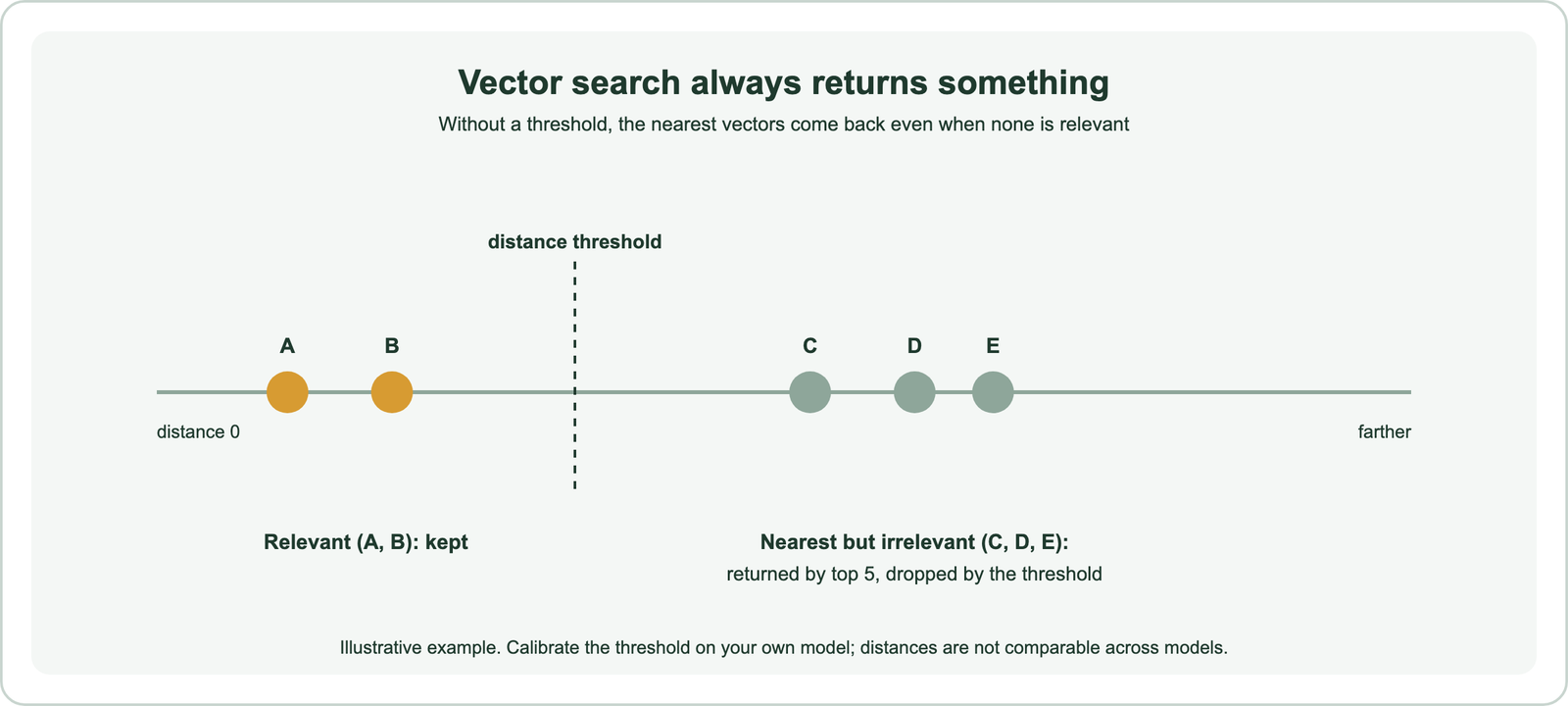
A threshold tells the search when to stop. Weaviate’s documentation lists the options: a limit on result count, a distance threshold, autocut, which cuts the list at the first large jump in scores, and filters. In hybrid search, max vector distance limits the vector side. Thresholds must be calibrated per model, since distances from different models are not comparable.
Approximate index recall is the second setting. HNSW trades recall for speed through ef; set too low, it skips true neighbours, so an exact search would return the right document but the index does not. ANN recall covers measuring it. Filters are the third. A system that filters after a fixed top k can return few or wrong results for restrictive filters, while Weaviate applies filters as an allow-list during the search. Diagnosis tells you which fix applies.
How do you fix irrelevant vector search results?
You fix irrelevant vector search results by matching each fix to the diagnosed cause. Repair data and chunks first, then add hybrid search, query rewriting and reranking for model limits, and finally tune thresholds and index recall. Measure after every change.
- Missing or mismatched data: re-import, re-embed with one model, and add checks that every object has a vector.
- Poor chunks: re-chunk by structure, keep titles with their sections, and test sizes on failing queries.
- Identifiers and look-alikes: use hybrid search so keyword matching handles exact terms, as in when to use hybrid search.
- Near-miss ordering: add a cross-encoder reranker over the top candidates.
- Vague or conversational queries: rewrite or expand queries before search.
- No-answer queries: add a calibrated distance threshold or autocut.
- Low index recall: raise ef and check filter strategy.
The order matters because later fixes hide earlier problems. A reranker can make a bad chunking scheme look acceptable until the right chunk is not in its candidates at all. Fixing the data first gives every later step better material. Proving that a fix worked needs measurement.
How do you know a fix improved vector search relevance?
You know a fix improved relevance when retrieval metrics on a fixed set of labelled queries go up, and the original failing queries now succeed, without new failures elsewhere. Judging by a few hand-picked examples is not enough.
Keep the failing queries from diagnosis, add a broad sample of normal queries, and record the relevant documents for each. Score every change with metrics that match the use: recall at k for RAG, MRR for single-answer search, nDCG at 10 for ranked lists. Information retrieval metrics compares them, and the individual pages on recall at k, precision at k, mean reciprocal rank and nDCG explain each. Relevance vs recall covers why a system can find everything and still feel wrong.
Public sets help with model choice, as described in retrieval benchmarks, but your own queries decide. After release, watch queries with no clicks, quick reformulations and abandoned sessions, covered in online search metrics and analytics and monitoring search quality in production. The full process is in how to evaluate semantic search.
Vector search returns irrelevant results because it always returns the nearest vectors and because nearness depends on the model, the data, the query and the settings. Diagnose in order: confirm the right document is indexed with the query’s model and in a sensible chunk, check whether it ranks in an exact search, then check the index and threshold. Fix data and chunking first, add hybrid search, query rewriting and reranking for model limits, and calibrate a distance threshold or autocut for questions with no answer. Measure every change on a fixed set of labelled queries before trusting it.