Home / Build it / How to Build a Semantic Search Engine
How to Build a Semantic Search Engine
Building semantic search means choosing an embedding model, splitting content into searchable chunks, storing their vectors in an index, and ranking the chunks closest to each query. A working prototype takes a short script: connect to a vector database, import documents so they are embedded, and run a semantic query. A production build adds the parts that make results trustworthy. Keyword evidence handles exact names and codes through hybrid search. Filters enforce rules such as product, date, and permission. A reranker improves the order of the top results, and a test set of real queries proves each change helps. The decisions that matter most are made before any code: what users search for, what unit to return, and which model fits the content. Get those right and the rest is configuration.
Building semantic search in four facts
- A semantic search build has an offline indexing path and an online query path that must use compatible embeddings.
- No single embedding model dominated every task across the 58 datasets of the MTEB benchmark.
- Weaviate’s suggested chunking baseline is 100 to 200 words with a 50-word overlap.
- Hybrid search runs keyword and vector retrieval together, so exact names and codes still match.
What does it take to build semantic search?
Building semantic search takes five components: content prepared into chunks, an embedding model, a vector index, a query path, and an evaluation set. Each can be bought or built, but none can be skipped. A demo that leaves out evaluation looks fine until real users arrive.
The components fall into two paths. The indexing path runs whenever content changes. It cleans and chunks documents, embeds each chunk, and stores the vectors with their metadata. The query path runs on every search. It embeds the query with the same model, finds the nearest chunks, applies filters, and ranks the results. The semantic search pipeline walks through both in detail.
This also answers how semantic search is done in practice. The system compares meaning, not words, by turning text into vectors. Take the query laptop that stays cool under load. It can find a product described as having an efficient thermal design, though the two share no key words. Each phrase describes the same need in different terms, and the embedding model learned that they are related. The semantic search versus vector search comparison explains why the vector lookup is only one part of the whole.
The rest of the work is engineering choices. Which model, what chunk size, which database, how to rank, and how to measure. Each choice is cheap early and expensive late, so planning comes first.
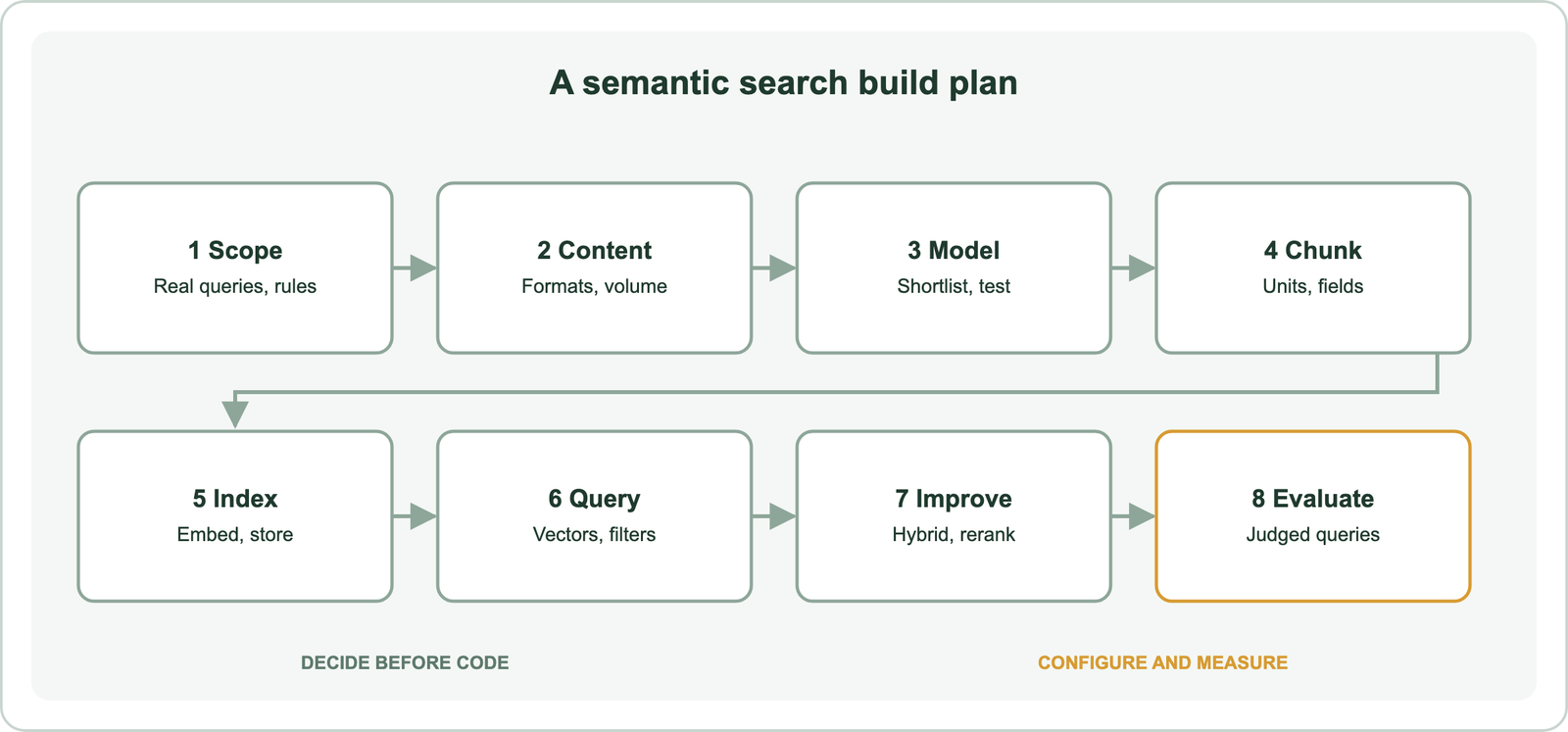
How do you plan a semantic search build?
A semantic search build is planned by defining the queries it must answer, the content it searches, the unit it returns, and the rules it must enforce. These four answers shape every later choice.
Start with queries. Collect real searches from logs, support tickets, or user interviews. Note how many are natural-language questions, how many are product names or codes, and how many mix the two. A query mix heavy in exact identifiers needs strong keyword matching. A mix heavy in descriptive questions benefits most from semantic retrieval.
Then list the content. Note the formats (web pages, PDFs, tickets, code), the languages, the volume, and how often it changes. Volume drives memory. Weaviate’s best-practice guide estimates about 6 GB of memory for one million 1024-dimensional vectors, so sizing starts here. Semantic search over documents and PDFs covers extraction from difficult formats.
Decide the returned unit and the rules. Users may want a whole document, a section, or one answer paragraph. Rules include which products, dates, regions, or permission groups each user may see. Those become metadata fields and filters, not part of the embedding.
Finally, write down how success will be measured. A small set of real queries with judged results is enough to start. Planning settles what the system must do. The model decides how well it understands the content.
How do you choose an embedding model for semantic search?
An embedding model for semantic search is chosen by shortlisting candidates on public benchmarks, then testing them on your own queries and content. No model is best everywhere. Muennighoff and colleagues’ MTEB benchmark, published at EACL 2023, covered 8 tasks, 58 datasets, and 112 languages across 33 models. Its authors found that no single embedding method dominated across all tasks.
That finding answers a frequent question, which AI model is best for semantic search. The honest answer is the one that scores best on your data within your budget. Weaviate’s evaluation course follows exactly that path: shortlist by public scores, then run a custom benchmark on real content. It notes that even 20 objects with several queries can give meaningful results.
Practical filters narrow the list quickly:
- Language coverage must include every language users search in.
- Domain fit matters for legal, medical, code, or scientific text.
- Dimensions drive memory, so smaller vectors cost less at scale.
- Hosting decides whether text leaves your infrastructure for an API.
The list turns a benchmark ranking into a shortlist that fits real constraints. The embeddings guide explains what the model produces. Choose carefully, because changing the model later means embedding every chunk again. What gets embedded is the next decision.
How should content be chunked and structured before indexing?
Content should be split into chunks small enough to match one idea and large enough to keep its context, with metadata stored beside each chunk. The chunk is the unit a search can return. A chunk that mixes three topics matches all three weakly.
Weaviate’s retrieval-augmented generation guide states that no chunking strategy fits every case. As a starting baseline it suggests 100 to 200 words with a 50-word overlap, and it recommends linking each chunk back to its source document. Splitting on headings or paragraphs usually beats splitting at a fixed character count, because it keeps ideas whole. Chunking for semantic search compares the strategies, and framework splitters such as LangChain’s semantic chunker are covered in semantic search with LangChain and LlamaIndex.
Decide which fields get embedded. Titles and body text carry meaning. IDs, URLs, prices, and dates do not. Weaviate’s course lists vectorizing non-semantic data such as IDs and URLs as an anti-pattern that adds cost for little benefit. Keep those as plain properties for filtering and display. In Weaviate, a property can be excluded from the embedding with skip_vectorization=True.
A good schema also plans for later. Store the source document ID, section title, position, language, and update date with every chunk. Search index schema design covers field types in detail. With chunks and fields defined, content can go into the index.
How do you index content in a vector database?
Content is indexed by creating a collection with an embedding model configured, then importing the chunks so the database embeds and stores each one. The example uses Weaviate’s Python client version 4 with a local instance and a locally run embedding model, following Weaviate’s quickstart.
import weaviate
from weaviate.classes.config import Configure, Property, DataType

chunks = [
    {"title": "Cooling", "body": "Efficient thermal design keeps the laptop quiet under heavy load.",
     "product": "laptops", "doc_id": "kb-101"},
    {"title": "Battery", "body": "A full charge lasts a long working day of office tasks.",
     "product": "laptops", "doc_id": "kb-102"},
]

with weaviate.connect_to_local() as client:
    client.collections.create(
        name="HelpChunk",
        vector_config=Configure.Vectors.text2vec_ollama(
            api_endpoint="http://ollama:11434",
            model="nomic-embed-text",
        ),
        properties=[
            Property(name="title", data_type=DataType.TEXT),
            Property(name="body", data_type=DataType.TEXT),
            Property(name="product", data_type=DataType.TEXT, skip_vectorization=True),
            Property(name="doc_id", data_type=DataType.TEXT, skip_vectorization=True),
        ],
    )
    help_chunks = client.collections.use("HelpChunk")
    with help_chunks.batch.dynamic() as batch:
        for chunk in chunks:
            batch.add_object(properties=chunk)
    if help_chunks.batch.failed_objects:
        print(help_chunks.batch.failed_objects[0])
The script creates a collection, embeds the title and body of each chunk during import, and keeps product and document ID as filterable properties. Batch import sends objects in groups and reports failures afterwards. Weaviate also accepts precomputed vectors when embeddings come from elsewhere.
Other databases follow the same pattern with different syntax. Step-by-step versions exist for Weaviate, Pinecone, Qdrant, Milvus, Chroma, and Redis. Teams already running a database other than Weaviate can use Postgres with pgvector, Elasticsearch, or OpenSearch. Choosing a vector database compares them, and semantic search with Python covers a library-only approach. Once the index holds content, it can answer queries.
Size the index before importing everything. Memory grows with the number of chunks and the vector dimensions, and Weaviate’s estimate of about 6 GB per million 1024-dimensional vectors shows how quickly it adds up. Vector compression reduces it. Weaviate’s compression guide lists 8-bit rotational quantization as cutting vector memory by about 75 percent with recall of 98 to 99 percent in its tests, without a training step. Decide on compression early, because Weaviate notes that quantization cannot be turned off once it is set on a collection. Import a representative sample first, measure memory and recall, and only then load the full collection. The same sample becomes the first evaluation set.
How do you query a semantic search index?
A semantic search index is queried by embedding the query text with the same model and returning the stored chunks whose vectors are closest, optionally restricted by filters. With a configured vectorizer, Weaviate embeds the query automatically.
import weaviate
from weaviate.classes.query import Filter

with weaviate.connect_to_local() as client:
    help_chunks = client.collections.use("HelpChunk")
    response = help_chunks.query.near_text(
        query="laptop that stays cool under load",
        limit=5,
        filters=Filter.by_property("product").equal("laptops"),
    )
    for obj in response.objects:
        print(obj.properties["title"], obj.properties["doc_id"])
The query shares no key words with the cooling chunk, yet semantic retrieval can match them by meaning. The filter limits candidates to one product line. Weaviate applies filters before the vector search, building an allow list of eligible objects first, so filtered queries still return a full set of results. Metadata filtering explains the trade-offs.
Two settings matter at this stage. The limit sets how many results come back. A nearest result always exists, even when nothing is relevant, so a production build may also set a distance threshold.
Weaviate’s search documentation lists four ways to trim weak results: a limit, a distance threshold, automatic cutoff, and filters. A distance threshold drops anything farther than a chosen value. Automatic cutoff stops the list where scores fall sharply, which adapts to each query. Neither has a universal setting, because distances depend on the model and metric. Pick thresholds from the judged test set: find the distance where irrelevant results start to dominate, then check that relevant ones still pass. Showing users “no good match” is often better than showing a confident wrong answer.
Semantic retrieval alone can still blur exact identifiers such as model numbers, which is where keyword evidence comes back in.
How do hybrid search and reranking improve a semantic search build?
Hybrid search improves a build by adding keyword matching for exact terms, and reranking improves it by reordering the top results with a more precise model. Together they are the most common way to optimize search using embeddings.
import weaviate

with weaviate.connect_to_local() as client:
    help_chunks = client.collections.use("HelpChunk")
    response = help_chunks.query.hybrid(
        query="X15 overheating fix",
        alpha=0.5,
        limit=5,
    )
Weaviate’s hybrid search runs a BM25 keyword search and a vector search in parallel and fuses the two result lists. The alpha parameter sets the balance: 0 is keyword only, 1 is vector only, and 0.5 weighs them equally. A query that mixes a model code with a description needs both signals. The hybrid search guide covers fusion methods and tuning.
Reranking adds a second pass. A reranker model reads the query and each candidate together and reorders them. Weaviate’s reranker modules work with vector, keyword, and hybrid queries, and the search limit sets how many candidates the reranker sees. Reranking adds latency and cost per candidate, and it cannot recover a result the first stage missed. Reranking explains when it earns its place.
Query-side techniques are a third lever. Rewriting, expansion, and intent detection change the query before retrieval. Query understanding covers those. Each lever should be switched on only if a test shows it helps.
How do you test and launch a semantic search build?
A semantic search build is tested against a set of real queries with judged results, and launched only after it beats a keyword baseline on that set. Testing turns opinions about relevance into numbers that can be compared.
A launch checklist keeps the work honest:
- Judge results for a sample of real queries on one written scale.
- Measure recall and nDCG for keyword, semantic, and hybrid configurations.
- Load-test latency at expected traffic with production-sized data.
- Check filters and permissions so no user sees restricted content.
- Monitor zero-result rates and reformulated queries after launch.
The checklist covers quality, speed, and safety in one pass. The evaluation guide explains test sets and metrics in depth. For growth, scaling semantic search covers memory, compression, and sharding.
A RAG pipeline reuses everything here. Retrieval feeds passages to a language model instead of a results page, so retrieval quality limits answer quality. Semantic search in RAG covers the extra steps. Later changes of database are covered in migrating to a new vector database.
Plan for change from the start. Content updates need re-embedding only for the chunks that changed, so store a content hash or update date with each chunk and re-import only what differs. Deleted documents must remove all their chunks, which is why each chunk keeps its source document ID. A new embedding model is different: every chunk must be embedded again, because vectors from two models cannot be compared. The safe pattern is to build the new index alongside the old one, run the judged test set against both, and switch queries only when the new one wins. That turns a risky migration into a measured release.
When does a hosted semantic search API make more sense than building?
A hosted semantic search API makes more sense than building when the team needs results quickly, has a modest collection, and does not want to operate infrastructure. Yes, anyone can build their own search engine, and the code above is most of a prototype. The question is who maintains it.
Building gives full control over models, ranking, data location, and infrastructure spending. It also means running the database, upgrading it, monitoring it, and re-indexing when models change. A hosted API hides the index and often the embedding step, and bills per use. Semantic search APIs compares the options, and semantic search tools compared covers the wider field.
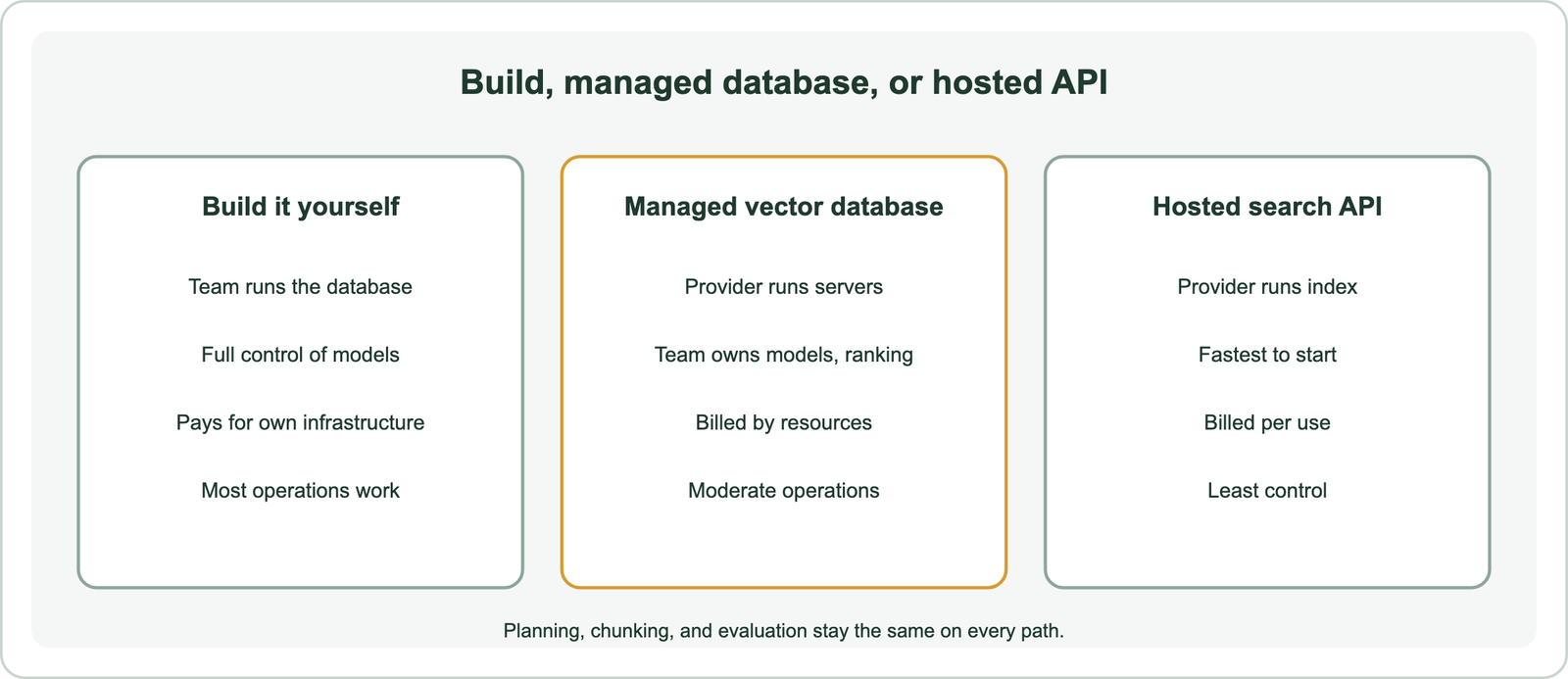
A middle path is common: a managed vector database. The team owns content, models, and ranking, and the provider runs the servers. Whichever path is chosen, the planning, chunking, and evaluation steps stay the same. Start with the path that puts a measured prototype in front of real queries fastest, then revisit the choice once usage and costs are known. Questions such as whether ChatGPT uses semantic search are answered in semantic search use cases.
Building semantic search means choosing an embedding model, chunking content, storing vectors in an index, and ranking the chunks closest to each query. A short script gets a prototype running. A production build adds hybrid search for exact terms, filters for hard rules, reranking for precise ordering, and a judged test set that proves each change. The decision is to plan queries and returned units first, test models on your own content, and launch only when the build beats a keyword baseline on real queries.