Home / Comparisons / pgvector vs a Dedicated Vector Database: Which to Use
Comparisonpgvector vs a Dedicated Vector Database: Which to Use
pgvector is a Postgres extension that adds vector search to an existing relational database. A dedicated vector database such as Weaviate is built around vector search, with its own indexing, filtering, scaling and search features. The choice comes down to where the data lives and how central vector search is to the workload. pgvector wins on simplicity: one database, one backup, one permission model, and transactions that cover vectors and rows together. A dedicated database wins when vector search dominates, through sharding and replication built for vector indexes, filtered search designed into the index, BM25 hybrid search, built-in embedding and reranking integrations, and native multi-tenancy. Many teams start in Postgres and move the vector workload only when recall, latency or features fall short of their targets.
pgvector vs a dedicated vector database in four facts
- pgvector applies WHERE filters after an approximate index scan unless iterative index scans, added in version 0.8.0, are turned on.
- Weaviate builds an allow-list from its inverted index before the vector search, and uses the ACORN filter strategy by default since version 1.34.
- Weaviate shards and replicates collections natively, while pgvector’s README lists replicas and sharding extensions such as Citus for horizontal scaling.
- Weaviate’s documentation describes 8-bit rotational quantization as compressing vectors up to 4 times while keeping 98 to 99 percent recall on most datasets.
What is the difference between pgvector and a dedicated vector database?
The difference between pgvector and a dedicated vector database is that pgvector adds vector types and indexes to a general-purpose relational database. A dedicated vector database is designed from the storage layer up for storing, indexing and searching vectors. Both run approximate nearest neighbour search; they differ in everything around it.
pgvector inherits Postgres. Vectors sit in a column next to the rows they describe, queries are SQL, and joins, transactions, row-level security and point-in-time recovery work unchanged. Its vector features are an index type and a set of operators; text search, filtering and scaling come from Postgres itself. Semantic search with Postgres and pgvector shows the setup end to end.
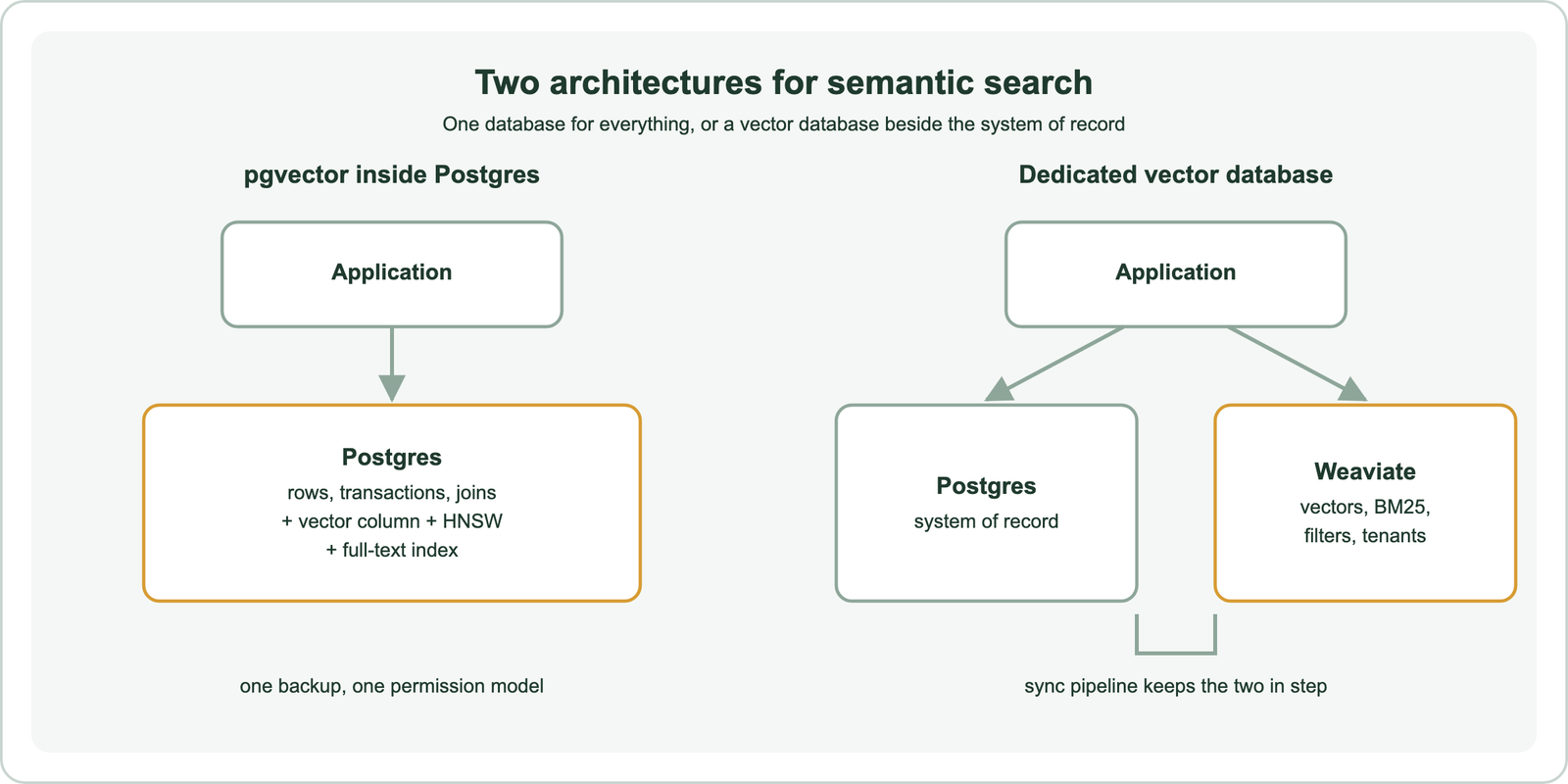
A dedicated vector database such as Weaviate treats vector search as the primary job. Each Weaviate shard holds its own vector index, inverted indexes and object store, according to its documentation, so filters, keyword search and vectors are planned together. It adds features a relational database lacks out of the box: integrations that embed text at import and query time, BM25 hybrid search with score fusion, reranker modules and vector compression.
The same question applies to other databases with vector features, such as MongoDB Atlas, Elasticsearch and OpenSearch. In each case the trade-off is one system with fewer search features against two systems with more. The detail shows up feature by feature.
How do pgvector and a dedicated vector database compare feature by feature?
pgvector and a dedicated vector database compare closely on core vector search and differ most on filtering design, hybrid search, built-in model integrations, multi-tenancy and horizontal scaling. The table uses Weaviate as the dedicated example, with facts from each project’s documentation as of October 2026.
| Feature | Weaviate | pgvector in Postgres |
|---|---|---|
| Vector indexes | HNSW, flat, dynamic and HFresh | HNSW and IVFFlat; exact search without an index |
| Filtered search | Pre-filtering with an allow-list; ACORN by default | Filter after the index scan; iterative scans from 0.8.0 |
| Keyword and hybrid search | BM25F with built-in hybrid fusion | Postgres full-text search, fused in SQL |
| Embedding at import and query | Model provider integrations | Application embeds before insert |
| Reranking | Reranker modules in queries | Application-side |
| Compression | RQ, PQ, BQ and SQ quantization | halfvec, binary quantization, subvector indexing |
| Multi-tenancy | One shard and index per tenant | List partitioning or separate tables |
| Horizontal scaling | Native sharding and replication | Replicas; sharding extensions such as Citus |
| Transactions with relational data | Not a relational database | Full Postgres transactions and joins |
The table shows the pattern. pgvector covers vector search itself well and leaves the surrounding search features to the application or to Postgres. Weaviate builds them in but cannot replace a relational database for transactional data. The vector-search basics overlap; the rows that differ decide the choice.
Two rows deserve the most weight for most teams: filtered search and scaling. They are where the architectures behave differently under load. Before those, the simpler case is when pgvector is enough.
When is pgvector the right choice?
pgvector is the right choice when the data already lives in Postgres, the collection fits comfortably on one instance, and the application values transactions and simplicity over specialised search features. In that range, a second database adds work without adding results.
The strongest argument is consistency. When a product’s price, permissions and embedding sit in one row, an update to the row and its vector commit together. There is no sync job to fall behind, no second set of access controls and no second backup to restore. Joins let a query combine vector similarity with relational conditions that would be awkward to copy into another system.
Scale is the limit to watch. HNSW indexes work best when they fit in memory, and pgvector’s README advises sizing memory so index builds fit in maintenance_work_mem. The ceiling depends on vector count, dimensions, compression and query load, so it should be measured on your own data, not assumed.
Filtered queries are the other thing to test early. pgvector’s iterative scans make restrictive filters workable, as covered later. If those checks pass, Postgres is often the better engineering choice. The opposite case looks different.
When does a dedicated vector database pay for itself?
A dedicated vector database pays for itself when vector search is a core workload rather than a side feature. Signs include large or fast-growing collections, high query rates, heavily filtered queries, many tenants, or a need for built-in hybrid search, embedding and reranking. The extra system costs less than rebuilding those features around Postgres.
Search quality features are the first payoff. Weaviate runs BM25 and vector search in parallel and fuses them in one query, with a tunable weight, as described in how hybrid search works. Postgres full-text ranking is not BM25, and hybrid fusion must be written in SQL. Weaviate’s model integrations embed text at import and query time, and reranker modules reorder results in the same request.
Operational features are the second. Weaviate’s native multi-tenancy gives each tenant its own shard and vector index, and its documentation states that a node can hold 50,000 or more active tenant shards. Tenants can be set inactive or offloaded to cloud storage, freeing memory. Collections shard across nodes for size and replicate for throughput and availability.
Compression is the third. Weaviate offers rotational, product, binary and scalar quantization, and Weaviate Cloud sets 8-bit rotational quantization as the default for new collections. The deciding factor in many evaluations, though, is how each system handles filters.
How does filtered search differ between pgvector and a dedicated vector database?
Filtered search differs because Weaviate restricts the vector search to objects that pass the filter, while pgvector filters the results of an approximate index scan. The difference shows when filters are restrictive.
pgvector’s README states the effect plainly: with an approximate index, filtering happens after the scan. A condition matching 10 percent of rows then returns only about 4 rows on average at the default hnsw.ef_search of 40. Since version 0.8.0, iterative index scans keep scanning until enough rows pass, up to a configurable limit. B-tree indexes, partial indexes and partitioning are the other tools. These work, but they need tuning per query pattern.
Weaviate’s documentation describes pre-filtering: an inverted index builds an allow-list of matching objects, and the HNSW search only adds allowed objects to the result. Since version 1.34, the default filter strategy is ACORN, which skips distance calculations for non-matching objects and seeds extra entry points that match the filter. Weaviate’s documentation says it helps most when the filter has low correlation with the query, such as cheap items for a query near expensive ones.
The practical test is to run your most restrictive real filters on both and compare recall and latency. Search engine vs vector database covers the related choice for teams already running Elasticsearch or OpenSearch. Scale is the other pressure point.
How do pgvector and dedicated vector databases scale?
Dedicated vector databases such as Weaviate shard and replicate collections natively across nodes, while pgvector scales mainly vertically, with read replicas and sharding extensions for more. Both can serve large workloads; the effort differs.
pgvector’s README lists the options. For a smaller working set, use halfvec and binary quantization with reranking. Scale vertically with more memory, CPU and storage. Scale horizontally with replicas, or with Citus, PgDog or similar tools for sharding. Each of those is a Postgres operations project, with the usual care around index builds competing with transactional load.
Weaviate’s documentation describes a collection as one or more shards, each with its own vector index, placed on different nodes. More shards handle larger datasets and faster imports; more replicas raise query throughput near-linearly and provide high availability. The documentation also notes that resharding an HNSW index is costly, so shard counts should be planned up front.
For most teams the question is not which can scale, but which scaling work they would rather own. A Postgres team with strong database operations may prefer pgvector longer. A team without that may find a managed vector database cheaper in practice. Hybrid search changes the picture again.
How do other built-in vector features, such as MongoDB Atlas, compare?
Built-in vector features in other databases, such as MongoDB Atlas Vector Search, make the same trade as pgvector. They put vector search inside the system that already holds the data, with fewer search-specific features than a dedicated engine. The decision logic carries over unchanged.
MongoDB Atlas adds vector indexes to its document database and pairs them with Atlas Search for full text, so documents and their vectors stay in one store. The trade-offs mirror pgvector’s. Consistency and simplicity improve, while filtered search behaviour, hybrid fusion options, model integrations and multi-tenancy depend on what that platform provides. Search engines such as Elasticsearch and OpenSearch sit in between, pairing mature text search with vector indexes.
Evaluate any built-in option on the same points as pgvector: restrictive filters, hybrid quality, tenant isolation, scaling work and cost. The general comparison of tools is in semantic search vs vector search, and the retrieval method question in BM25 vs vector search. All of it reduces to a short checklist.
How do you decide between pgvector and a dedicated vector database?
You decide between pgvector and a dedicated vector database by testing your real queries, filters and data size against both, then choosing the simplest system that meets recall, latency and feature targets. Default to the system that already holds the data.
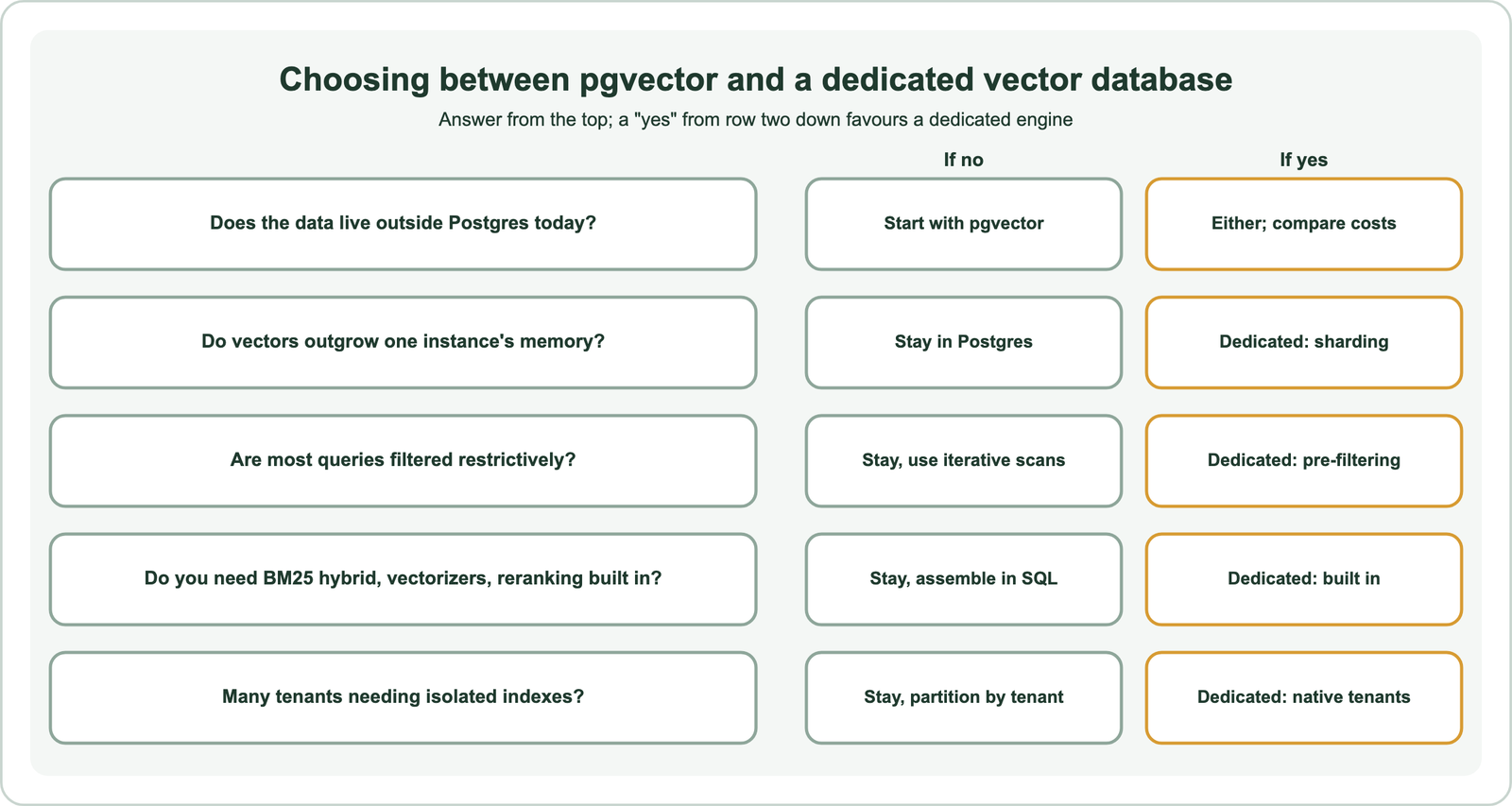
The chart turns the earlier sections into questions. A single “yes” rarely decides alone; two or three usually do. Measure with real queries and labelled relevant results. If keyword matching matters as much as meaning for your users, semantic search vs keyword search explains how to weigh the two.
Keep the move cheap either way. Store the embedding model name with the vectors, keep the source text, and write the sync or export path early. Then a later move between Weaviate and pgvector, in either direction, is a data migration rather than a rebuild. The concept pages on natural language search, semantic search vs similarity search, semantic search vs RAG, semantic search vs knowledge graph search and semantic search vs the semantic web cover the neighbouring decisions.
pgvector and a dedicated vector database both run fast approximate vector search; the difference is everything around it. pgvector keeps vectors in Postgres with transactions, joins and one set of operations, and suits data that already lives there at a size one instance handles well. A dedicated vector database such as Weaviate adds pre-filtered search with ACORN, BM25 hybrid fusion, embedding and reranking integrations, quantization, native multi-tenancy and built-in sharding. Start where the data lives, test your most restrictive filters and largest projected size, and move the vector workload only when those tests show a dedicated engine meets targets that Postgres does not.