Home / Keyword search / Full-Text Search: How It Works and Its Limits
ExplainerFull-Text Search: How It Works and Its Limits
Full-text search is a search method that indexes every word of every document and finds documents whose words match the words of a query, ranked by a scoring function such as BM25. It works in two phases. At index time, an analyzer splits text into tokens, lowercases them and often removes stopwords or reduces words to stems, then stores each token in an inverted index. At query time, the same analyzer processes the query and the index returns matching documents. Features such as phrase matching, fuzzy matching for typos, Boolean operators and field boosts make the matching more precise or more forgiving. Full-text search is fast, predictable and excellent for names, codes and exact phrases. Its limit is the vocabulary gap: it cannot match a document that expresses the same idea in different words. Semantic search closes that gap, and hybrid search combines the two.
Full-text search in four facts
- Full-text search matches query tokens against an inverted index built from every word of every document.
- Weaviate’s default keyword tokenization, word, splits on non-alphanumeric characters and lowercases the result.
- Weaviate’s trigram tokenization enables fuzzy matching by splitting text into overlapping three-character sequences.
- Full-text search cannot match synonyms or paraphrases unless they appear in the text or a synonym list.
What is full-text search?
Full-text search is a way of searching that examines all the words in stored documents, rather than only titles, tags or other metadata, and returns documents containing the query’s words. Most search boxes on websites, apps and databases are full-text search engines.
The name contrasts with older approaches that searched only a catalogue record or a set of assigned keywords. A full-text engine looks inside the body of every document. A query for “refund window” finds any document whose text contains those words, wherever they appear.
Full-text search is a form of keyword search. The terms are often used interchangeably, with full-text search stressing that the whole text is indexed, as covered in what is keyword search. Weaviate, Elasticsearch, OpenSearch and PostgreSQL all provide it, and so does nearly every search library.
A full-text engine does not scan documents at query time. Scanning millions of documents for each query would be too slow. It builds an index ahead of time that maps every word to the documents containing it. How that index is built decides what a query can match, so the build steps come first.
How does full-text search work?
Full-text search works by running every document through an analyzer that turns text into tokens, storing those tokens in an inverted index, and running each query through the same analyzer before looking up its tokens. Matching is exact at the token level.
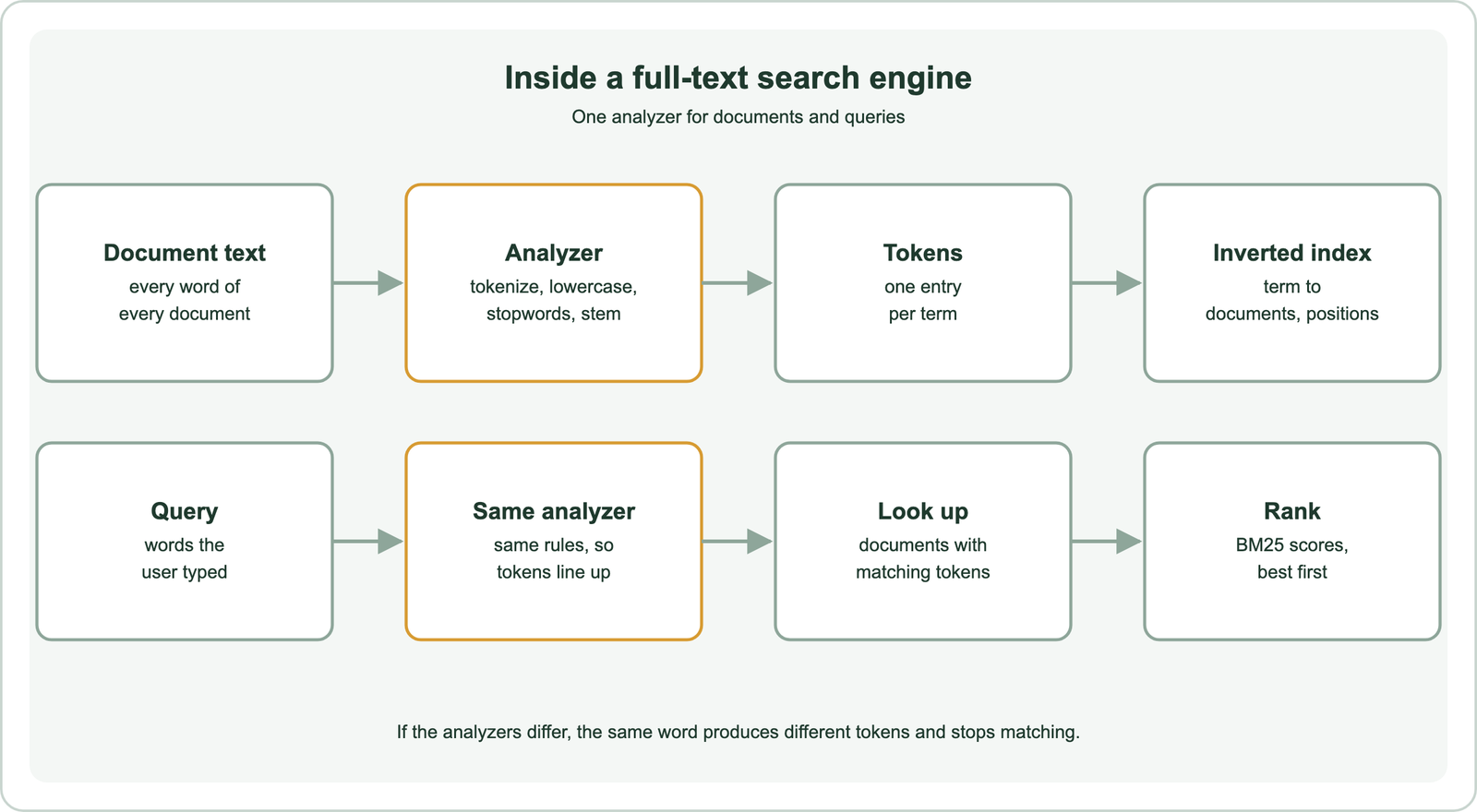
The analyzer is a chain of steps. Tokenization splits text into units. Normalization lowercases them and may strip accents. Stopword removal drops very common words such as “the”. Stemming or lemmatization reduces “returns” and “returned” to a shared form. Each resulting token gets an entry in the inverted index, explained in the inverted index.
Weaviate’s documentation describes the query side for its keyword search. A query such as “A red Nike shoe” is tokenized to “a”, “red”, “nike” and “shoe”. The stopword “a” is removed. The remaining tokens are scored with BM25F against the selected properties, and the highest-scoring objects are returned. The details of each analyzer step decide which documents a query can reach.
How does tokenization change what full-text search can match?
Tokenization changes what full-text search can match by deciding where words split, whether case is kept and whether symbols survive. Two documents match only if the analyzer produces the same tokens for them.
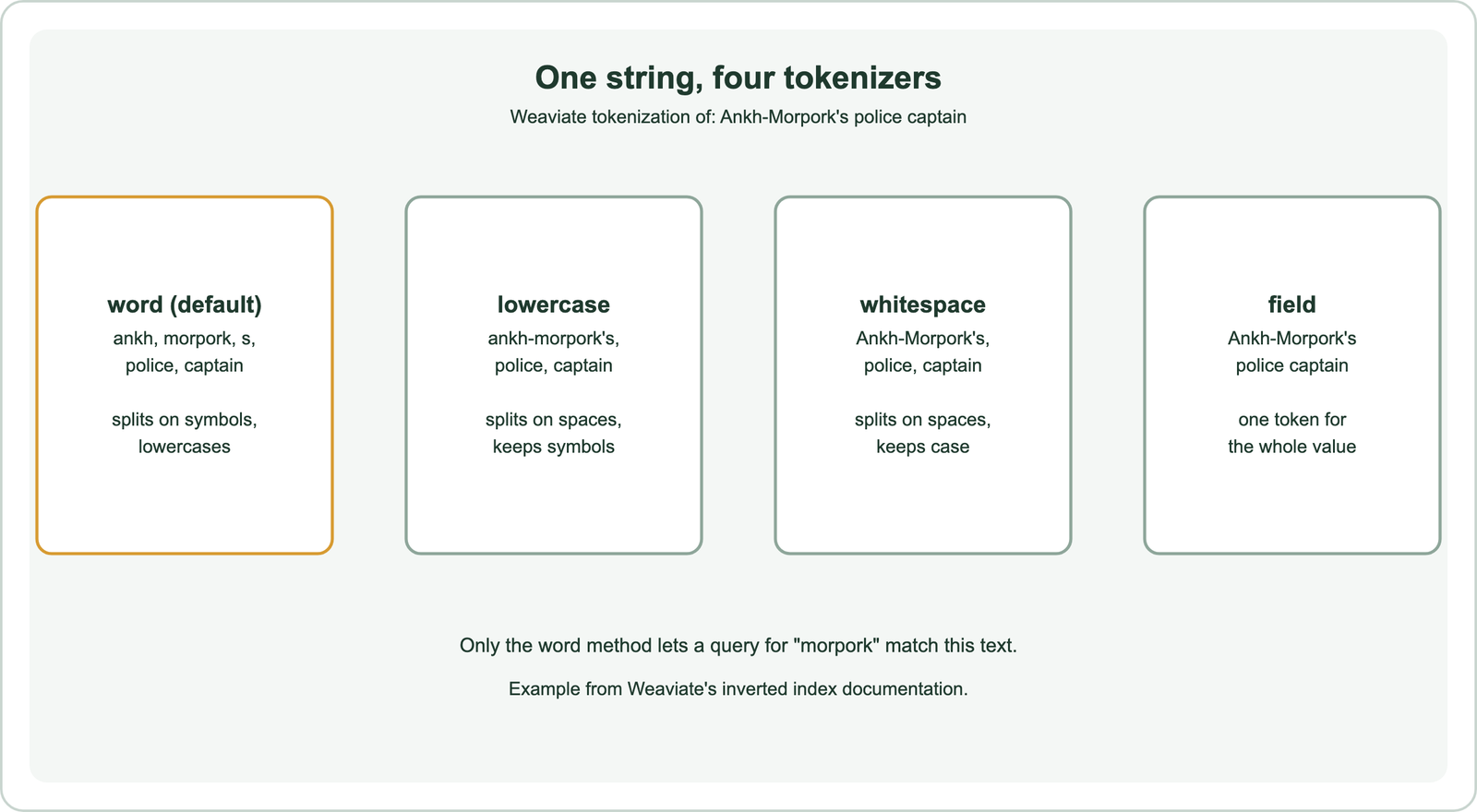
Weaviate’s inverted index documentation shows the effect on the text “Ankh-Morpork’s police captain”. The default word method splits on non-alphanumeric characters and lowercases, giving ankh, morpork, s, police and captain. The lowercase method splits only on whitespace and keeps symbols, so “ankh-morpork’s” stays whole. The whitespace method also keeps case. The field method treats the entire value as one token.
Each choice suits different data. Word tokenization fits prose. Lowercase keeps email addresses and code identifiers intact. Field tokenization fits IDs and URLs that must match exactly. Weaviate sets tokenization per property, so a title and a product code in the same collection can use different methods.
The same documentation gives a filter example: with word tokenization, “variable_name” matches “variable_new_name”, because both contain the tokens variable and name. That is helpful for prose and harmful for identifiers. Languages without spaces between words, such as Japanese and Chinese, need dedicated segmenters, which Weaviate provides as optional tokenizers. Splitting is the first step; reducing word forms is the next.
How do stemming and stopwords affect full-text search?
Stemming affects full-text search by mapping different forms of a word to one token, and stopwords affect it by removing very common words from matching or scoring. Both widen matches at some cost to precision.
Without stemming, a query for “running shoes” does not match a document that says “run” or “shoe”. A stemmer cuts suffixes by rule, turning “running” into “run”. A lemmatizer uses a dictionary to find the base form, turning “ran” into “run” as well. The trade-offs are covered in stemming and lemmatization.
Stemming can also merge words that should stay apart. An aggressive stemmer may reduce “university” and “universe” to the same stem. Product names and technical terms suffer most. For those fields, plain tokenization without stemming is usually safer.
Stopwords are handled differently by different engines. Weaviate’s keyword search documentation explains that stopwords are still indexed and only filtered at query time, so changing the stopword list does not require reindexing. Its tutorial also shows that stopwords affect ranking even when they do not prevent a match. Some phrases depend on stopwords, such as “to be or not to be”, so removing them can break phrase search. Matching words in order is its own feature.
How does full-text search handle phrases and word order?
Full-text search handles phrases by storing the position of each token in the inverted index, so a phrase query can require the words to appear next to each other and in order. Without positions, the index knows only which words a document contains.
A plain multi-word query treats words independently. Weaviate’s tokenization tutorial shows this: its keyword search returns objects matching any query token, and “lois clark” and “clark lois” give the same scores. Documents with more matching tokens rank higher, but word order plays no part.
Phrase search adds a constraint. The query “new york” must match the two tokens at consecutive positions, which excludes a document that says “new office in york”. Proximity search relaxes this to “within N words”. Engines such as Elasticsearch offer phrase queries, and PostgreSQL’s text search has a followed-by operator for the same purpose.
Positions make the index larger, because every occurrence is recorded, not just every document. They also slow queries slightly, since positions must be compared. Phrase matching is precise but unforgiving. A single misspelt word breaks it, which is where fuzzy matching helps.
How does full-text search tolerate typos with fuzzy matching?
Full-text search tolerates typos with fuzzy matching, which accepts tokens that are close in spelling to the query token, measured by edit distance or by shared character sequences. It trades precision for forgiveness.
Edit distance, also called Levenshtein distance, counts the single-character insertions, deletions and substitutions needed to turn one word into another. “Morgn” is one insertion away from “Morgan”. An engine can accept any indexed token within one or two edits of the query token. Elasticsearch offers this as fuzzy queries.
Weaviate takes a different route. Its keyword search documentation describes trigram tokenization, which splits text into overlapping three-character sequences. “Morgn” and “Morgan” share trigrams such as “org”, so BM25 can match them. The documentation lists typo tolerance, name reconciliation, search-as-you-type and partial matching as uses.
Both approaches have costs. Weaviate’s documentation notes that trigram tokenization creates larger inverted indexes, may slow queries on large datasets and changes filter behaviour. It advises using it only on fields that need fuzzy matching and keeping exact-match fields on word or field tokenization. Fuzzy matching fixes spelling, but not word choice. Operators give the user more direct control.
How do Boolean operators and field boosts refine full-text search?
Boolean operators refine full-text search by requiring, allowing or excluding terms, and field boosts refine it by counting matches in some fields more than others. Both make ranking reflect what matters.
By default, many engines treat a multi-word query as OR: any matching word qualifies, and more matches rank higher. An AND operator requires every word. A minimum-match setting sits between them. Weaviate’s BM25 search exposes this through a search operator, available from version 1.31, with an And option and an Or option that takes a minimum number of matching tokens.
Field boosts weight matches by where they occur. A match in a title usually signals more than a match deep in a body. Weaviate’s academy course shows the syntax for product search: “name^4” makes matches in the name count four times more, and “category^2” twice more, than matches in the description. This is BM25F, the field-aware form of BM25 explained in the BM25 algorithm.
Term weighting itself comes from the same family of ideas as TF-IDF, which rewards rare terms over common ones, as covered in TF-IDF. All of these features tune how words match. None of them lets a word match a different word with the same meaning.
What are the limits of full-text search?
The main limit of full-text search is the vocabulary gap: it cannot match a document that uses different words for the same idea. Stemming, fuzzy matching and operators all work on the words that are present.
A query for “cancel my subscription” misses a help article titled “How to end your membership”. A search for “laptop won’t turn on” misses “notebook fails to boot”. The words differ, so no token matches. This is the vocabulary mismatch problem, covered in the vocabulary mismatch problem.
The traditional fixes are synonym lists and query expansion. Both require someone to anticipate the variants, and lists drift out of date. Full-text search also has no sense of intent. A query phrased as a question, such as “why is my invoice higher this month”, is just a bag of words to it.
These limits are not flaws for every task. Exact matching is what you want for part numbers, error codes, legal citations and names. Many teams find their search works for some queries and fails for others because the query types differ. That pattern points to the comparison with semantic search.
How does full-text search compare with semantic and vector search?
Full-text search compares with semantic and vector search as exact word matching against meaning matching: full-text wins on identifiers and exact phrases, vector search wins on paraphrases and natural-language questions. Hybrid search uses both.
Vector search embeds the query and the documents with a model and ranks by closeness, so “end your membership” can match “cancel my subscription”. It is weaker on rare tokens such as SKUs, version numbers and new product names, which the model may not represent well. Full-text search handles exactly those cases. The trade-offs are covered in semantic search vs keyword search and BM25 vs vector search.
Weaviate’s search documentation summarizes the split. Keyword search fits names, codes, error strings and any term that must appear literally. Vector search fits queries whose wording differs from the data. Hybrid search, which fuses both rankings into one, is described as a good default for text search. The method is explained in hybrid search.
In practice, full-text search remains part of most semantic systems rather than being replaced. It supplies the keyword half of hybrid ranking and powers exact filters. Knowing how its analyzer behaves is what makes that half work well.
Full-text search indexes every word of every document, analyzes queries with the same tokenizer, stemmer and stopword rules, and ranks matching documents with BM25. Tokenization decides what can match, positions enable phrase search, trigrams or edit distance tolerate typos, and operators and field boosts refine the ranking. It is fast and exact, which makes it the right tool for names, codes and literal phrases. It cannot bridge different words for the same idea. Use full-text search for exact matching, vector search for meaning, and hybrid search in Weaviate or a similar engine when one search box must serve both.