Home / Embeddings / How to Re-Embed Content When the Model Changes, Without Downtime
TutorialHow to Re-Embed Content When the Model Changes, Without Downtime
Re-embedding means generating new vectors for every stored item with a new embedding model. Doing it without downtime means building the new index beside the old one and switching traffic only after it is verified. A model change is never a partial update. Vectors from two different models live in different spaces, so a query embedded by the new model cannot be compared with documents embedded by the old one. The safe pattern borrows from blue-green deployment. The old index keeps serving queries while a new collection is filled in the background with fresh embeddings. Writes that arrive during the backfill go to both. When the new index beats the old one on a judged test set, traffic moves to it in one step. In Weaviate, a collection alias makes that step instant and reversible.
Re-embedding in four facts
- Vectors from different embedding models cannot be compared, so a model change means re-embedding every item.
- A zero-downtime switch builds the new index beside the old one and moves traffic only after verification.
- Weaviate collection aliases switch traffic between collections in one atomic step and allow instant rollback.
- Keeping source text beside vectors is what makes re-embedding possible at all.
What does re-embedding mean?
Re-embedding means running stored content through an embedding model again to produce new vectors, usually because the model has changed. The text stays the same. The numbers that represent it are replaced.
An embedding is the vector a model produces for a piece of text, and the model is the function that produces it. The words are often used loosely. “Vector” names the data structure, a list of numbers. “Embedding” names a vector that a model learned to place by meaning. Every embedding is a vector, but not every vector is an embedding. The embeddings guide explains how they are made.
Re-embedding happens for several reasons. A team adopts a better model, a provider retires an old one, a model is fine-tuned on domain data, or the team changes embedding dimensions to save memory. Each of these produces vectors that no longer match the stored ones. Smaller, routine re-embedding also happens when individual documents change, which only touches the edited items.
A common worry is whether embeddings drift on their own. A fixed model given the same input is designed to return the same vector, though small numerical differences can appear across hardware or library versions. Real drift usually comes from changing the model, the preprocessing, or the content. The serious case is a full model change, because it touches everything at once.
Why does a new embedding model require re-embedding everything?
A new embedding model requires re-embedding everything because each model learns its own vector space, and distances are only meaningful between vectors from the same space. Mixing models produces search results that look valid but are essentially random.
Two models trained separately place the same sentence in unrelated positions. Even if they share a dimension count, dimension 17 in one model means nothing in the other. A query vector from the new model, compared with document vectors from the old one, measures distance between two incompatible coordinate systems. Nothing errors. Results simply stop making sense, which makes the failure easy to miss.
Different dimension counts make the problem obvious, because the index rejects vectors of the wrong length. Matching dimensions hide it. That is why the migration must be complete before queries switch: every stored item needs a vector from the new model, and every query must be embedded by that same model.
The same rule covers smaller changes. A fine-tuned version of the same base model is a new model for this purpose, as is a change in preprocessing that alters the text the model sees. Changing which fields are embedded also changes every vector. That is why model choice is the hardest setting to change later. Because the cost is total, the first question is whether a change is worth making at all.
When is re-embedding worth the cost?
Re-embedding is worth the cost when a new model clearly beats the current one on your own judged queries, by enough to pay for compute, migration work, and risk. A better score on a public leaderboard is a reason to test, not a reason to migrate.
Weaviate’s tutorial on switching vectorizers sets out the method. Pick a representative subset of the data. Measure search quality with the current model as a baseline. Embed the same subset with the new model and measure again. Deploy only if the new model shows a clear improvement. Choosing an embedding model and the MTEB leaderboard guide cover how to build the shortlist.
Weaviate’s blog post “When Good Models Go Bad” offers rough thresholds. For high-risk applications such as healthcare or legal work, a 5 to 8 percent gain on critical metrics may justify migration. Standard applications such as customer support or ecommerce might need 10 to 15 percent. These are judgment guides, not rules, and they assume gains measured on your own data.
Count the full cost. Embedding every item costs inference time or API fees. A parallel index needs extra memory while both exist. Engineering time goes into the backfill, verification, and cleanup. A forced change, such as a retired model, skips the question of whether, but not the question of how. The answer to how is a parallel index.
How do you re-embed content without downtime?
Content is re-embedded without downtime by building a new index next to the live one, filling it in the background, and switching queries to it in a single step once it is verified. The pattern is often called blue-green indexing, after the deployment technique it copies.
The plan has six stages:
- Create a new collection configured with the new model.
- Backfill it by importing every item so the new model embeds it.
- Mirror new writes to both collections while the backfill runs.
- Verify the new collection on a judged test set against the old one.
- Switch query traffic to the new collection in one step.
- Retire the old collection after a safe waiting period.
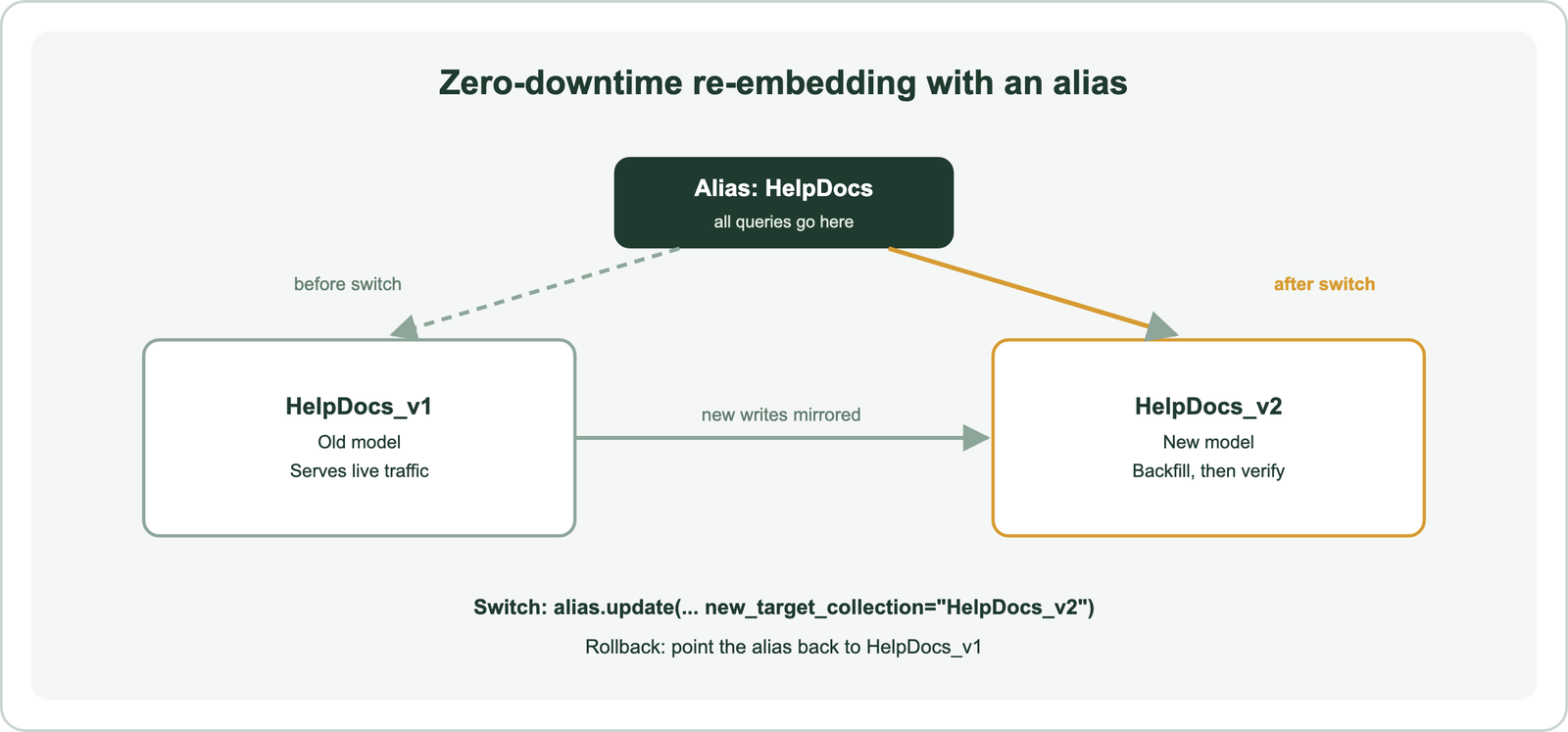
The old collection serves every query until the switch, so users see no gap. The cost is temporary: two copies of the data, with two sets of vectors, exist side by side for the length of the migration. Plan memory for that overlap, using the sizing in scaling semantic search.
Other databases support the same pattern. Qdrant, for example, documents its own embedding model migration procedure, and most systems can achieve it with two indexes and an application-level switch. Weaviate makes the switch a built-in feature.
How do collection aliases make the switch instant?
Collection aliases make the switch instant because the application queries a stable alias name, and moving the alias to the new collection is one atomic operation. Weaviate added aliases in version 1.32 and made them generally available in version 1.33.
Weaviate’s documentation describes an alias as a pointer to a collection. Searches, imports, and other object operations sent to the alias are routed to its target. The application never names the real collection, so no code changes when the target moves.
import weaviate

with weaviate.connect_to_local() as client:
    # One-time setup: the application always uses the alias name
    client.alias.create(alias_name="HelpDocs", target_collection="HelpDocs_v1")

    # Later, after HelpDocs_v2 is backfilled and verified
    client.alias.update(alias_name="HelpDocs", new_target_collection="HelpDocs_v2")

    docs = client.collections.use("HelpDocs")   # now queries HelpDocs_v2
    response = docs.query.near_text(query="reset a locked account", limit=5)
The code creates the alias once, then repoints it when the new collection is ready. Weaviate’s how-to states that updating an alias is atomic and switches instantly. Rollback is the same call with the old collection name.
Weaviate’s vectorizer-migration tutorial recommends aliases for production migrations. It lists zero-downtime switching, instant rollback, isolation of old and new models in separate collections, and no lasting storage overhead once the old collection is deleted. If the application currently uses a collection name directly, the first step is to introduce an alias pointing at today’s collection. The new collection still needs data.
How do you backfill millions of documents safely?
Millions of documents are backfilled safely by streaming them from the source of truth in batches, letting the new model embed each batch, and tracking failures so every item is accounted for. The backfill is the longest stage and the one most likely to fail partway.
Read from the system that owns the content, such as a database or document store, rather than from the old vector collection. That keeps the backfill independent of the index being replaced. Weaviate’s tutorial also shows reading objects from the old collection when that is the only copy, which works because Weaviate stores the source properties alongside vectors.
Batch the import. Weaviate’s Python client offers batching modes such as batch.fixed_size(batch_size=200), and its import guidance recommends server-side batching for bulk loads. After each run, the client’s failed_objects list shows what did not import, so it can be retried. Batch embedding covers throughput, rate limits, and cost control when the model is a paid API.
Make the job restartable. Record the last processed ID or a checkpoint, so an interrupted run resumes instead of starting over. Use stable object IDs so a retried item overwrites rather than duplicates. Finish with a count check: the number of objects in the new collection should match the source. A spot check of a few random objects, comparing their properties in both collections, catches mapping errors that a count alone would miss. A backfill takes time, and content keeps changing while it runs.
How do you estimate the time and cost of a re-embedding run?
The time and cost of a re-embedding run are estimated from three numbers: how many chunks exist, how many tokens each holds, and how fast and at what price the model embeds them. A short calculation before the migration prevents a surprise bill or a backfill that runs for days.
Cost for an API model is total tokens times the provider’s price per token. Total tokens are the number of chunks times their average length. Measure both from the real collection rather than guessing, because chunk size varies widely between collections. Self-hosted models replace the price with compute time on your own hardware, which still has a cost.
Time is total chunks divided by sustained throughput. Throughput is limited by the slowest of three things: the model’s speed, the provider’s rate limits, and the vector database’s import rate. Run a timed import of a few thousand real chunks to measure it. Then multiply out to the full collection and add margin for retries.
Two choices change the numbers. Shorter vectors from a smaller or Matryoshka model reduce memory during the overlap period, when both indexes exist. Re-embedding only the fields that carry meaning, not IDs or boilerplate, reduces tokens. Weaviate’s training material lists vectorizing non-semantic data such as IDs and URLs as an anti-pattern that adds cost for little benefit. The estimate also sets the length of the window in which writes must be kept in sync.
How do you handle new writes during the migration?
New writes during the migration are handled by sending every create, update, and delete to both collections, or by recording them and replaying them into the new collection before the switch. Otherwise the new index is already stale on the day it goes live.
Dual writing is the simplest approach. The application, or the pipeline that feeds the index, writes each change to the old collection and the new one. The old collection stays correct for live queries, and the new one receives changes as they happen. Deletes matter as much as inserts, because a document removed from one index but not the other will reappear after the switch.
A change log works when dual writing is hard. Record every change with a timestamp during the backfill. After the backfill finishes, replay the log into the new collection, then repeat with any changes made during the replay until the gap is small. Switch while the gap is closed.
Incremental updates use the same machinery after the migration. Only documents that actually changed need new embeddings. Teams often store a content hash or update time with each item and re-embed only when the text has meaningfully changed. Once writes are in sync, the last step before switching is proof that the new index is better.
How do you verify the new index and roll back?
The new index is verified by running the same judged queries against both collections, and rolled back by pointing the alias at the old collection. The switch happens only if the new index wins. Verification turns a risky switch into a measured release.
Use a frozen test set of real queries with relevance judgments. Run it against the old and new collections with identical filters and result depth. Compare recall and nDCG, and read the queries where the two disagree. The evaluation guide explains how to build the set. Check operations too: object counts, latency at expected load, and memory.
A shadow period adds confidence. Send a copy of live queries to the new collection without showing its results, and log both result lists for comparison. When the numbers hold, switch the alias.
An A/B test is a stronger check when traffic allows it. Weaviate’s alias documentation lists A/B testing among the uses of aliases, alongside migrations and disaster recovery. One approach keeps two aliases, one per collection, and lets the application send a small share of users to the new one. Compare clicks, reformulated queries, and zero-result rates between the two groups for a fixed period. Offline judgments say whether the new model ranks better on known queries. An A/B test says whether real users notice. Together they turn the migration decision into evidence that both engineers and product owners can read. If the two disagree, trust the online result for user-facing search and investigate the judged set for gaps.
Keep the old collection for a while after the switch. If complaints or metrics turn, a single alias.update call restores it. Weaviate’s tutorial suggests deleting the old collection only after verification. Rollback depends on one more thing that is easy to lose: the original text.
Why should you store source text, not only embeddings?
You should store source text alongside embeddings because a vector cannot be turned back into its text, so without the source you cannot re-embed when the model changes. Storing only vectors locks the system to its current model.
Some designs keep documents outside the vector store and save only embeddings and metadata, often to save space or keep sensitive text in one place. That can work for search, because results can be looked up by ID. It still requires the full text to live somewhere reliable and addressable, because every future model change needs it. If the only remaining copy is the vector, re-embedding is impossible.
The practical rule is one source of truth for content, linked by stable IDs. The vector store can hold copies of the fields it needs for filtering and display. Weaviate stores object properties with their vectors, which is why its migration tutorial can read objects from the old collection and import them into the new one, where the new model embeds them.
Store versions too. Record which model and preprocessing produced each vector, as collection metadata or a property. During a migration that makes it clear which index holds which version. There is also an alternative to a whole new collection.
When should you add a second vector instead of a new index?
A second vector inside the same collection suits experiments that compare two models on the same objects, while a new collection behind an alias suits production migrations. Weaviate supports both, and its documentation is clear about the trade-off.
Weaviate lets a collection hold several named vectors, each with its own model and index. Since version 1.31, a named vector can be added to an existing collection. Existing objects do not get the new vector automatically. They must be deleted and reinserted to be embedded with it. Queries then pick a vector with target_vector, so both models can be compared on live data.
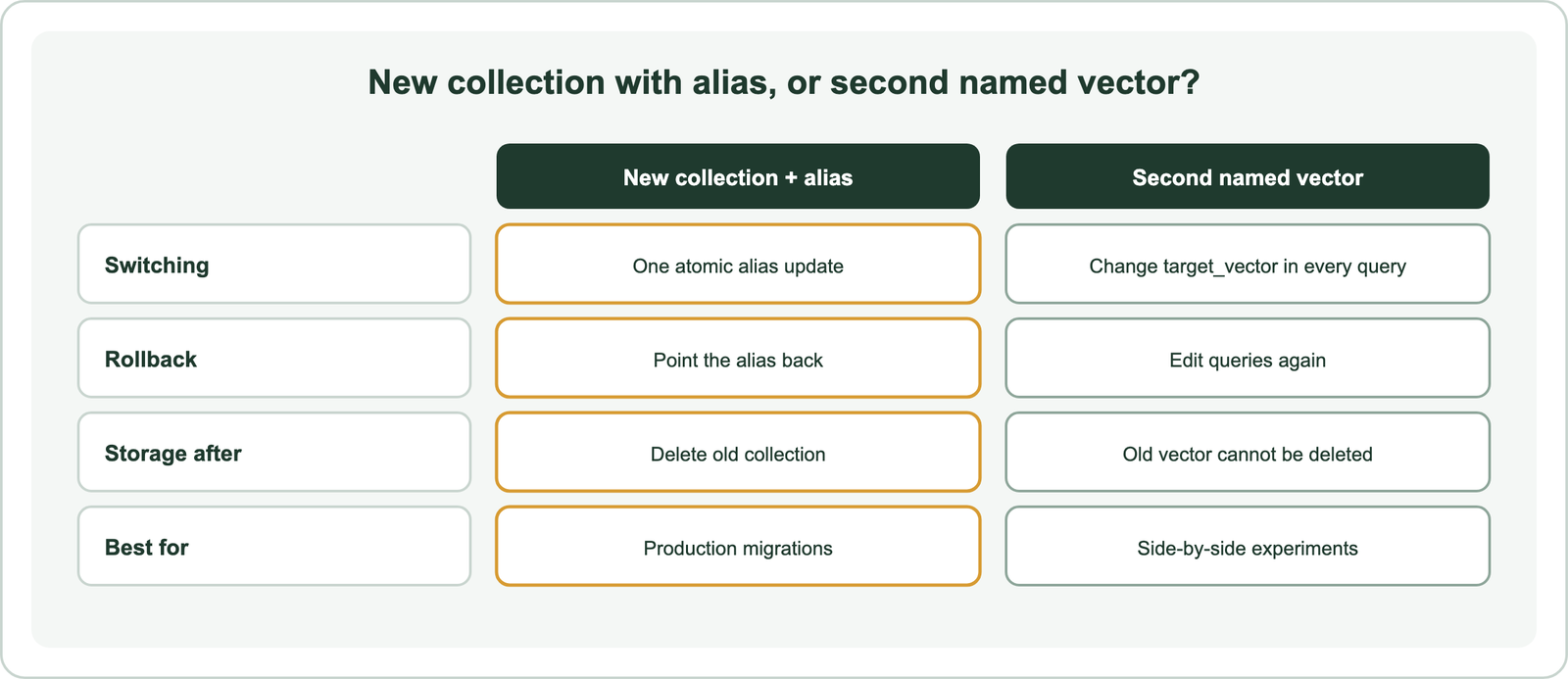
The catch is permanence. Weaviate’s tutorial notes that a named vector cannot be deleted once added, so storage grows for good. Rolling back also means changing every query to name the old vector. For that reason it recommends aliases for production and named vectors for testing. Other databases offer similar multi-vector features, and multimodal embeddings use the same idea to store text and image vectors together.
Related choices can reduce how often re-embedding is needed. Matryoshka embeddings allow shorter vectors from the same model, and embedding quantization shrinks vectors without a new model. Domain-specific embeddings, asymmetric versus symmetric search, tokenization versus embedding, and word versus sentence embeddings cover the model decisions that make a later migration more or less likely.
Re-embedding means generating new vectors for every stored item when the embedding model changes, because vectors from different models cannot be compared. Doing it without downtime means building a new collection beside the live one, backfilling it from the source text, mirroring writes, verifying it on judged queries, and then switching. In Weaviate, a collection alias makes that switch one atomic call and rollback another. The decision is to migrate only when your own tests show a clear gain and to keep source text so migration stays possible. Route every query through an alias, so the next model change is a pointer move, not an outage.