Home / Hybrid search / Hybrid Search Tutorial: Build It Step by Step
TutorialHybrid Search Tutorial: Build It Step by Step
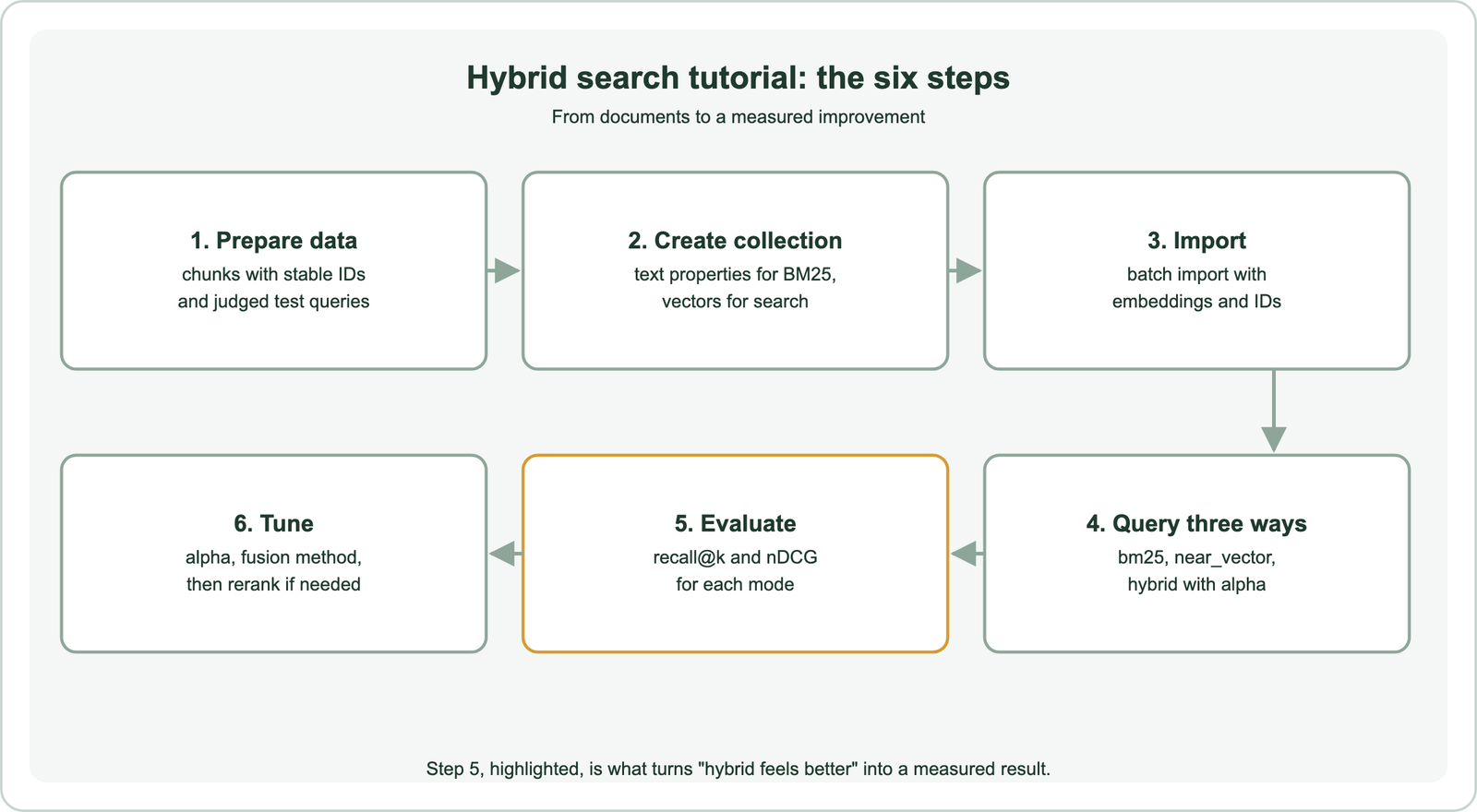
To implement hybrid search, store each document’s text and embedding in a database that supports keyword and vector search, then run a hybrid query that fuses BM25 and vector results. Measure the result against keyword-only and vector-only search on judged queries. The steps here use Weaviate and Python. You prepare chunks and a small test set, create a collection, import documents with embeddings and stable IDs, and query in three modes: bm25, near_vector and hybrid. Then you compute recall at k for each mode. Tune the alpha weight and fusion method on those numbers, not by feel. Hybrid search usually helps most on queries mixing natural language with exact terms, such as product codes and error messages. The evaluation shows whether it helps on yours.
Hybrid search implementation in four facts
- Hybrid search runs keyword (BM25) and vector search on the same documents and fuses the two rankings.
- In Weaviate, alpha 0 is pure keyword search, 1 is pure vector search, and values between blend them.
- Weaviate’s default fusion method since version 1.24 is relative score fusion.
- A small judged test set is enough to show whether hybrid search beats either mode alone on your data.
What does a hybrid search implementation involve?
A hybrid search implementation involves indexing text for keyword search and vectors for semantic search, querying both, fusing their results, and evaluating the fused ranking. One database can do all of it.
Keyword search catches exact terms such as product codes, error strings and names. Vector search catches paraphrases and loosely worded questions. Hybrid search combines them, as explained in what is hybrid search and how hybrid search works. Weaviate keeps a BM25 index on text properties and a vector index on embeddings in the same collection, so a single query can use both.
The tutorial uses a local model, all-MiniLM-L6-v2, so it runs without API keys, and Embedded Weaviate, which the Python client starts for you. The same code works against a Weaviate server or Weaviate Cloud by changing the connection line. Swap in a stronger or domain-specific embedding model later; the steps stay the same, and the evaluation will show whether the new model helps.
How do you prepare data for hybrid search?
You prepare data for hybrid search by splitting documents into passages, giving each a stable ID, and writing a small set of test queries with the passages that should answer them. The test set is part of the build, not an afterthought.
Split long documents into passages of one idea each, as described in chunking for semantic search. Keep the text whole for keyword search, since BM25 needs the actual words. Give each passage an ID derived from its source, so re-imports update rather than duplicate.
For the test set, collect real queries where possible: search logs, support tickets or questions from colleagues. Include natural-language questions, exact codes and names, and misspellings. Mark which passage IDs answer each one. A few dozen queries is enough to start; more give steadier numbers. Store the test set as plain data, a file mapping each query to its relevant IDs, so the same evaluation can run after every change and in automated tests. Search test sets and relevance judgments covers this in depth.
How do you create the collection and import documents?
You create the collection with text properties and a vector configuration, then batch-import passages with their embeddings and deterministic IDs. Text properties get a BM25 index automatically.
import weaviate
from weaviate.classes.config import Configure, Property, DataType
from weaviate.util import generate_uuid5
from sentence_transformers import SentenceTransformer

model = SentenceTransformer("all-MiniLM-L6-v2")
client = weaviate.connect_to_embedded()     # or connect_to_local() / connect_to_weaviate_cloud(...)

col = client.collections.create(
    "HelpDoc",
    vector_config=Configure.Vectors.self_provided(),
    properties=[Property(name="doc_id", data_type=DataType.TEXT),
                Property(name="text", data_type=DataType.TEXT)],
)
with col.batch.fixed_size(batch_size=100) as batch:
    for doc_id, text in docs.items():
        batch.add_object(properties={"doc_id": doc_id, "text": text},
                         vector=model.encode(text).tolist(),
                         uuid=generate_uuid5(doc_id))
print(len(col.batch.failed_objects), "failed")
The collection stores your own vectors here. You could instead configure a vectorizer so Weaviate embeds text on import and queries at search time, as shown in semantic search with Weaviate. Check failed_objects after every import, since batch errors do not raise exceptions.
Two details in the collection affect keyword search. Text properties use word tokenization by default, which lowercases and splits on punctuation; codes such as “E-4012” may be split into parts, so test them or use a different tokenization for code fields. Properties you never want matched by keywords, such as internal IDs, can be excluded from search. Settle these before importing large volumes, because tokenization is set per property when the collection is created.
How do you run keyword, vector and hybrid queries?
You run the three modes with bm25 for keyword search, near_vector for vector search, and hybrid with an alpha weight and fusion method for the combination. Keep them side by side for comparison.
from weaviate.classes.query import HybridFusion

def run(mode, query, k=10):
    vec = model.encode(query).tolist()
    if mode == "bm25":
        res = col.query.bm25(query=query, limit=k)
    elif mode == "vector":
        res = col.query.near_vector(near_vector=vec, limit=k)
    else:
        res = col.query.hybrid(query=query, vector=vec, alpha=0.5,
                               fusion_type=HybridFusion.RELATIVE_SCORE, limit=k)
    return [o.properties["doc_id"] for o in res.objects]
Passing your own query vector to hybrid keeps the vector side consistent with near_vector. Alpha 0.5 weights both sides equally; set it explicitly rather than relying on a default. Relative score fusion is Weaviate’s default since version 1.24, and HybridFusion.RANKED switches to rank-based fusion, as compared in relative score fusion and reciprocal rank fusion.
Print the top results for a few test queries in each mode before computing any metrics. Looking at them shows quickly where each mode fails: keyword search missing paraphrases, vector search missing a code, or hybrid search promoting a weak match. Requesting score metadata with return_metadata lets you see how close the top results are.
How do you prove hybrid search helped?
You prove hybrid search helped by computing the same metric, such as recall at k, for keyword, vector and hybrid modes on the same judged queries, and comparing the numbers. Report exact-term queries separately.
def recall_at_k(mode, k=10):
    total = 0.0
    for query, relevant in qrels.items():          # {"query": {"doc_id", ...}}
        found = set(run(mode, query, k))
        total += len(found & relevant) / len(relevant)
    return total / len(qrels)

for mode in ("bm25", "vector", "hybrid"):
    print(mode, recall_at_k(mode))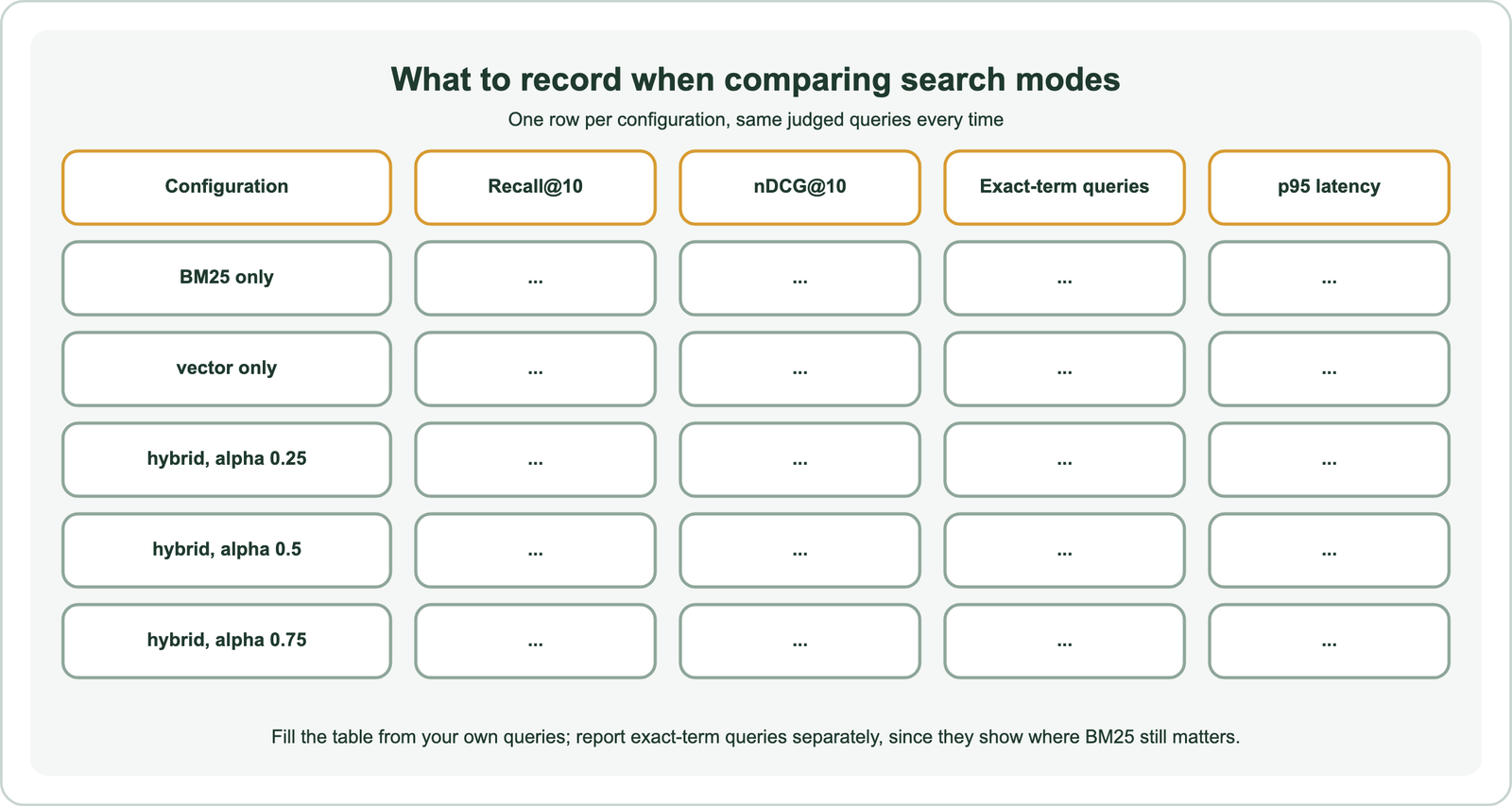
Recall at k shows whether the right passages appear in the top k at all, which matters most when results feed a language model. Add nDCG if your labels are graded, using a library such as pytrec_eval, covered in information retrieval metrics. Split the queries into exact-term and natural-language groups, and keep a third group for misspellings if your users make many. Record latency alongside quality, because hybrid search runs two searches and a fusion step, and the extra cost should be visible in the same table as the gain. A well-tuned hybrid setup can come close to the better mode on each group, which is the point of combining them.
How do you tune hybrid search after the first build?
You tune hybrid search by sweeping alpha, trying both fusion methods, adjusting the candidate pool, and adding a reranker if precision at the top still falls short. Change one thing at a time, and write down each result so later changes can be compared with the same baseline.
Run the evaluation at several alpha values, such as 0.25, 0.5 and 0.75, and keep the one with the best overall score that does not hurt exact-term queries. Compare relative score and ranked fusion at that alpha. If the right passage is usually somewhere in the top 20 but not the top 3, a cross-encoder reranker can reorder the shortlist. Balancing keyword and vector scores and score fusion methods go deeper.
Add filters for structured facts such as dates and categories rather than leaving them to either search. How keyword and vector scores are put on one scale is covered in score normalization. Recheck the numbers whenever the embedding model, chunking or content mix changes.
Which mistakes are common in a first hybrid search build?
Common mistakes in a first hybrid search build are mismatched embeddings, tokenization that breaks codes, too few candidates for fusion, and tuning on the same queries used to report results. Each is easy to check.
If documents and queries are embedded with different models, versions or normalization, vector results look random. Use one model object for both. If BM25 never finds product codes, inspect how the text property tokenizes them. If hybrid results change oddly when paging, the candidate pool per search leg may be too small, which Weaviate lets you raise. If alpha looks perfect on the test set but disappoints in production, the test set may be too small or too close to the documents’ own wording.
Guard against the last one by keeping two query sets: one for tuning and one held back for the final check. Add new failing queries from production logs as they appear. When to use hybrid search lists the situations where hybrid is most likely to pay off.
Where does hybrid search go after the tutorial?
After the tutorial, hybrid search usually moves into a RAG pipeline, an enterprise search product or a larger deployment, each with its own concerns. The evaluation habit carries over.
For assistants, hybrid search for RAG covers how many passages to pass and how to cite them. For internal search, hybrid search for enterprise search covers permissions and many sources. At scale, hybrid search on distributed databases covers sharding and candidate depth. Other databases are compared in databases that support hybrid search and hybrid search in SQL databases.
Whether hybrid is worth it at all is covered in when to use hybrid search and hybrid search vs vector search. In most text search with exact terms in the mix, the evaluation table gives the answer for your data.
Implementing hybrid search takes six steps. Prepare chunks and judged test queries, create a collection with text and vectors, and batch-import with stable IDs. Then query with bm25, near_vector and hybrid, evaluate each mode with recall at k, and tune. In Weaviate, a hybrid query fuses BM25 and vector results with an alpha weight, 0 for keyword and 1 for vector, using relative score fusion by default since 1.24. Report exact-term queries separately, sweep alpha and fusion on your own data, and add a reranker if the right passage is retrieved but ranked too low.